


The Unity side of a workflow built for multiple projects, multiple agents and multiplayer iteration. This UPM package runs the editor bridge used by the companion AnkleBreaker MCP server.
Install · Watch demos · Dashboard · Performance · Architecture · Validation
| 338 registered editor routes | Fair scheduling between agents | Multiplayer scenario tools |
|---|---|---|
| Scenes through optional integrations | FIFO per agent, grouped reads | MPPM controls and clone discovery |
The server also provides Hub and connection tools. Route counts describe the checked-in dispatcher; optional integrations require their own packages.
From a prompt to a playable prototype. The recorded neon brick-breaker workflow combines scene authoring, materials, C# gameplay scripts and visual iteration through Unity MCP.
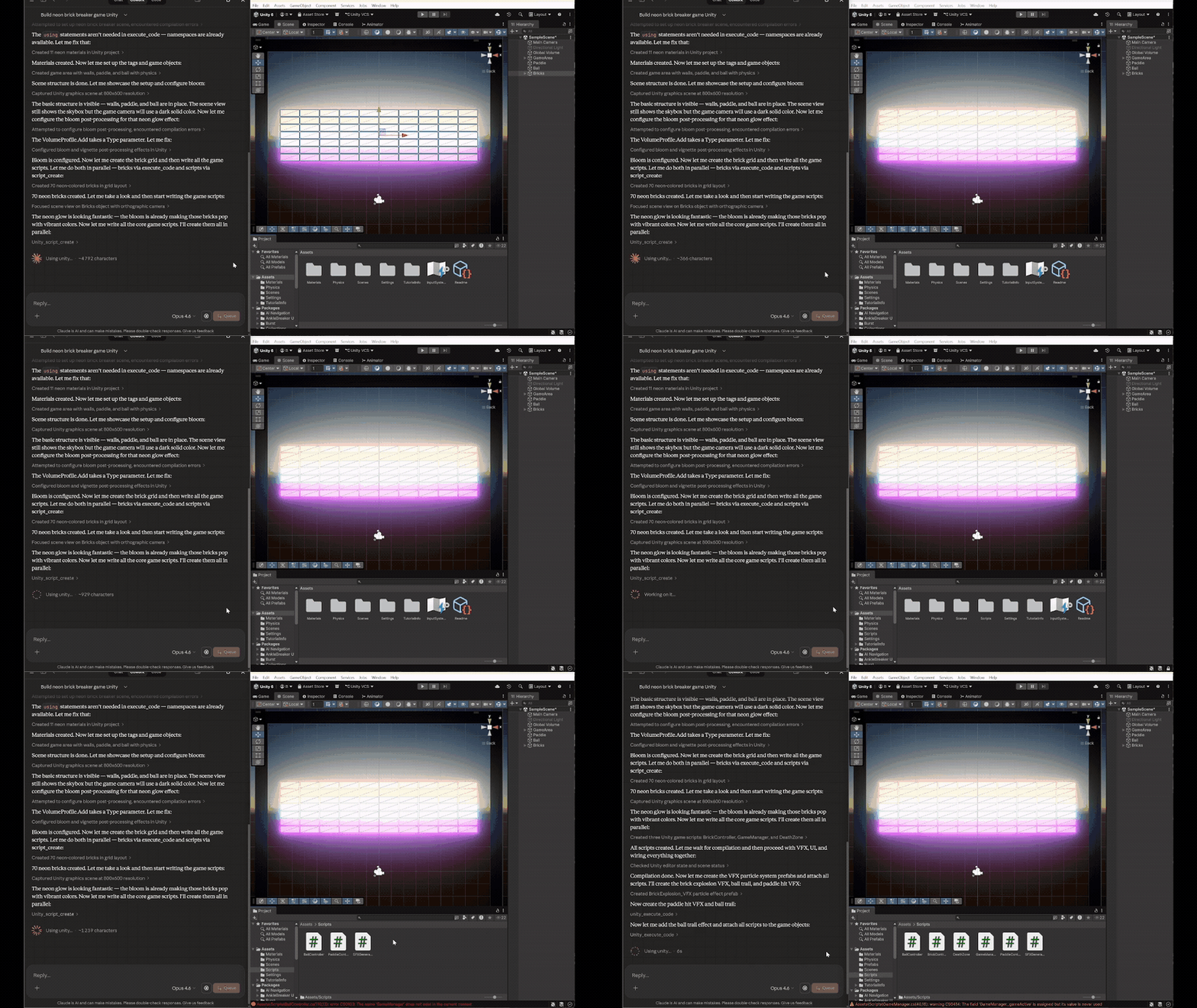
▶ Open video · 25 seconds · Download MP4 · Village and castle demos
Accelerated excerpts from existing recordings. The silent MP4s contain the same frames as the GIFs; their duration is not a development-time benchmark. Prompts and media details.
| Need | Plugin behavior | Evidence |
|---|---|---|
| Share an editor fairly | A FIFO queue per agent, round-robin scheduling and grouped reads. | Queue checks |
| Keep projects independent | A listener, queue and identity for each editor; the server pins each request to its target. | Architecture |
| Iterate on multiplayer | Native MPPM scenario/player controls and ParrelSync clone identity. | Host/Client · Clones |
| Inspect and recover | Attributed history, timings, supported Undo and protected ticket retries with an updated server. | Undo · Retry contract |
Install from source: the commands below install main in both repositories, including the improvements documented here. Published npm packages and version tags may lag behind main.
- In Unity, open Window → Package Manager → Add package from git URL.
- Add
https://github.com/AnkleBreaker-Studio/unity-mcp-plugin.git#main. - Open Window → AB Unity MCP → Dashboard and check the bridge status.
- Install and configure the Node MCP server.
- From your MCP client, call
unity_list_instances, select your project, then callunity_editor_state.
The default port is 7890; multiple editors can claim different ports. Discover the current project and port instead of assuming it remains the same after a restart. Browser navigation to the internal HTTP bridge is not the supported verification flow.
- Unity 2021.3.18f1 or newer is the declared compatibility floor.
- uGUI and Unity Test Framework are declared UPM dependencies because editor command classes compile against their APIs. The manifest uses minimum versions compatible with older supported editors; Unity 6.6 resolves its built-in versions.
- The companion Node server and an MCP client are needed for AI-driven operations.
Server and plugin versions advance independently. Queue and legacy synchronous paths remain available; version numbers do not need to match.
The MCP status dropdown appears automatically in Unity's main toolbar after import. It shows the bridge state and active-agent count; hover for port and diagnostic details. A later manual Hide choice is respected. Show Toolbar Status restores it without resetting the rest of your layout.
The same primary destinations are available under Window → AB Unity MCP and Tools → AnkleBreaker → Unity MCP: Dashboard, Welcome, Action History, settings, self-tests and documentation. The Dashboard's MCP Menu ▼ and the history window's MCP ▼ open the complete shared dropdown, including server controls and category switches. The canonical Welcome remains the one supplied by the upstream package.
Automatic visibility, menu map and validation →
The current companion server verifies the resolved identity when selecting by name and prevents stale discovery from replacing a newer project choice. Per-agent selections stay independent; include the discovered port on concurrent editor calls. Selection behavior and evidence.
Protocol 2 adds protected submission retries and session-scoped polling. An updated server can recover the original ticket when its acknowledgement is lost. Older clients keep using their existing endpoints; their retry behavior does not change. Protocol and compatibility details.
| Author | Inspect and verify | Coordinate |
|---|---|---|
| Scenes, objects, components and references | Scene hierarchy and search | Multiple editor projects |
| Prefabs, materials and ScriptableObjects | Console and compilation diagnostics | Per-agent queues and history |
| Animation, terrain, particles and audio | EditMode / PlayMode test jobs | MPPM scenarios and players |
| UI, lighting, navigation and builds | Screenshots, profiling and memory | ParrelSync clone discovery |
| Scripts and editor code | Named undo for supported writes | Project-specific context files |
Optional integrations include ProBuilder, UMA, Amplify Shader Editor, Shader Graph, VFX Graph, Input System, Memory Profiler and Multiplayer Play Mode. Discover their tools through unity_list_advanced_tools; the plugin reports unavailable packages or disabled categories instead of requiring every integration in every project.
UMA uses a separate assembly enabled by UMA_INSTALLED, keeping its references out of the core bridge. UMA V3.1f1 creation and rename workflows now pass on Unity 6.6, including legacy recipe references and preservation after file collisions. Actual UMA 2 execution and runtime avatar rendering remain unverified. UMA setup, evidence and reproduction.
Terrain, reusable houses, materials, trees, fences and paths, created and refined in the Unity Editor.
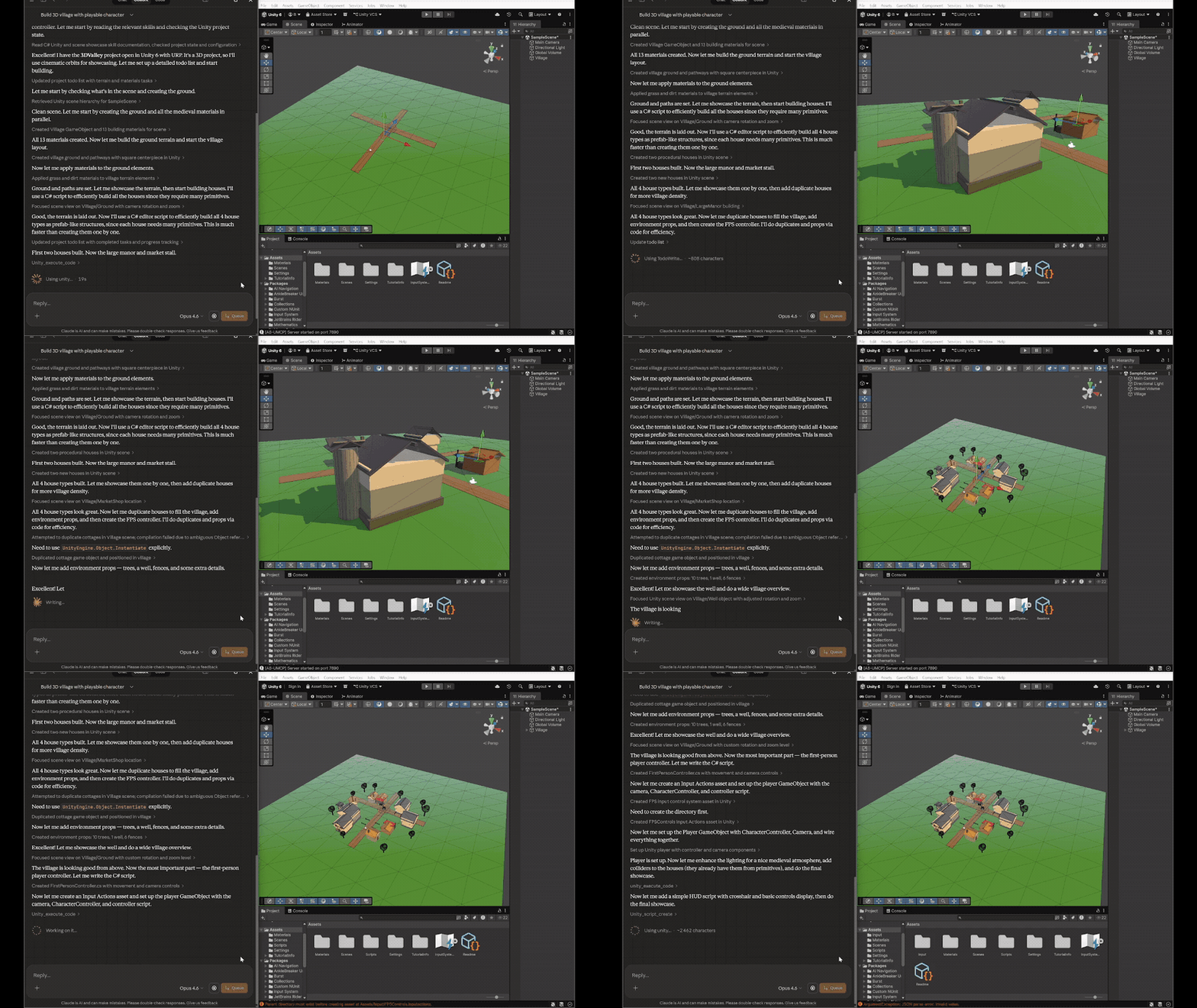
▶ Open video · 25 seconds · Download MP4
Multi-room construction, lighting adjustments and a first-person walkthrough in the recorded project.
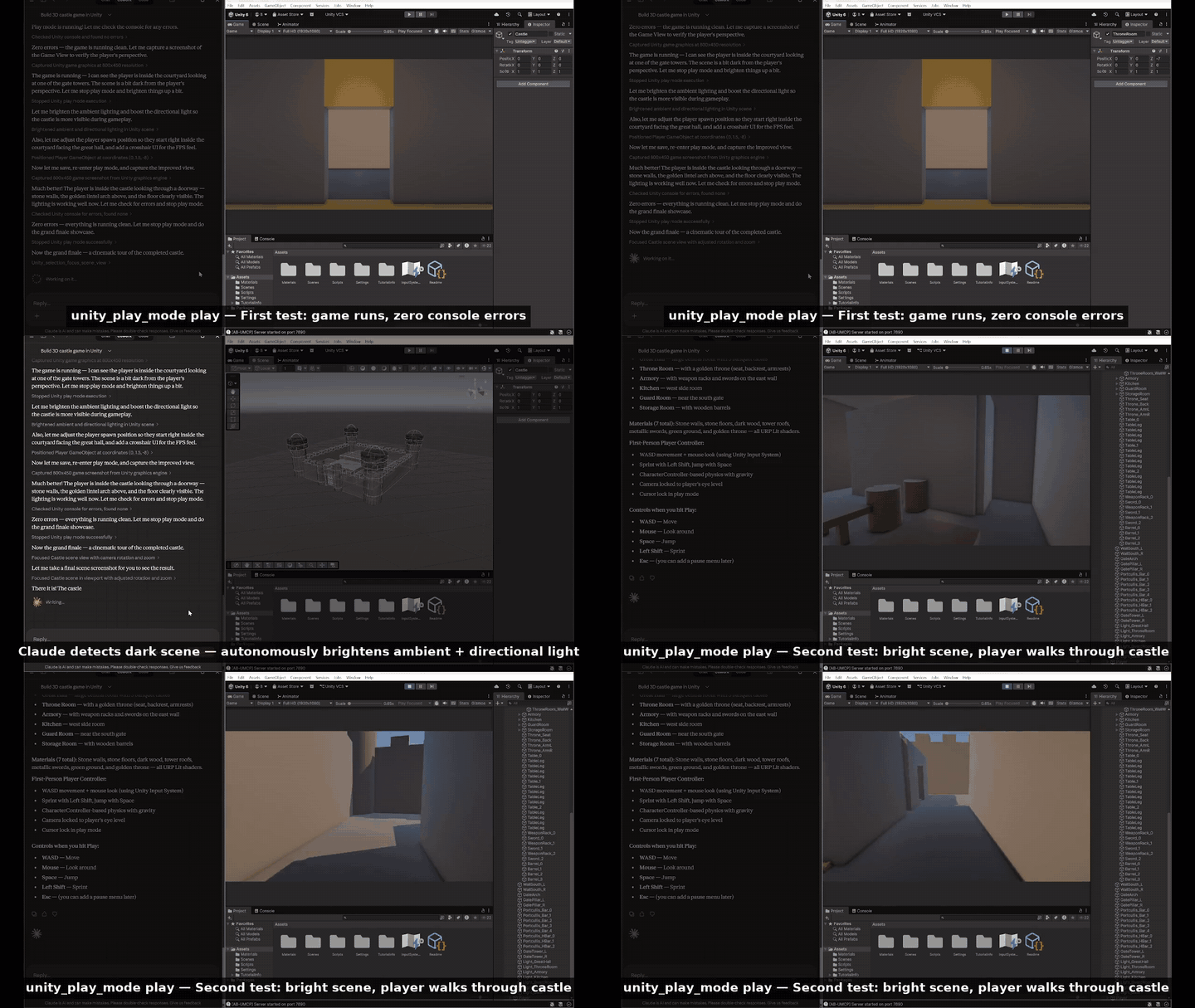
▶ Open video · 18 seconds · Download MP4
List my running editors, select my prototype and inspect its scene and compilation errors before making changes.
Discover the multiplayer tools, inspect the configured MPPM scenario and start its Host and Client players.
Run the selected EditMode tests, keep the job ID and retrieve its results in pages. Then show me the recent actions and which supported changes can be undone.
Results depend on your model, project and installed packages. More prompts and the full tool catalog.

Captured in a validation project. Long agent/request names deliberately exercise layout; the counters show that test session.
Open Window → AB Unity MCP → Dashboard in the project you want to inspect. Bridge controls, queue activity, agent cards and recent actions come first. Sections remember their state per project; long names and requests remain available in tooltips.
HTTP Activity adds response codes, active/peak requests, body traffic, rejected input, serialization failures and handler timings. Reload counts persist for the editor session; HTTP counters reset on domain reload. These transport counters stay separate from command outcomes. Fields, limits and validation.
| Inspect | What you can see |
|---|---|
| Queue | Pending/running counts, per-agent backlog and retention counters through unity_queue_info. |
| Agents | Attribution, outcomes and average queue-wait/processing times through unity_agents_list. |
| History | Request logs through unity_agent_log; action records and supported undo groups through unity_undo_history. |
| Code execution | Compiler-reference cache sizes, hits/misses and loaded snippet assemblies through unity_editor_state.codeExecution. |
Cards update in place. A measured changing-agent workload records 83% fewer allocation events than the baseline; layout and rendering are excluded. Twenty small code-execution calls fell from 15.85 s to 1.01 s in a separate Unity 6.6 fixture. These are workload-specific measurements. Dashboard evidence / Execution evidence.
Outstanding work keeps a session visible. At most 1,024 sessions without outstanding work are retained, including recently completed identities; inactive sessions also expire after 30 minutes, with at most 256 retained after periodic cleanup. A returning evicted identity starts fresh counters and logs. Ticket completion is atomic, and late callbacks cannot replace a terminal result or count it twice. A timeout does not cancel work that already started or prove that no changes occurred.
Monitoring fields, errors, history and retention / Ticket deadlines and retry behavior.

- The MCP server sends a command with agent identity to the local bridge.
- The bridge returns a queue ticket. Legacy calls wait on a ticket internally.
EditorApplication.updateprocesses one write or up to five explicitly classified reads, visiting agent queues fairly. Unknown routes use the write path.- Commands execute on Unity's main thread; deferred Unity APIs complete through callbacks.
- The MCP server polls the original ticket and returns text or images to the client.
Pending tickets are indexed by ID, avoiding a scan across every agent queue on each status request. Supported synchronous writes get individual named undo groups. Deferred commands do not collapse undo groups across intervening work from other agents.
Each editor has its own listener, queue and project identity. The server handles request isolation and per-call routing. The plugin handles editor scheduling, history, optional integrations and reload lifecycle. Heavy Unity operations still occupy the main thread; queueing does not make arbitrary editor work non-blocking.
The bridge binds to loopback and checks incoming browser/host metadata. It is intended for the companion server on the same machine. Local code-execution tools have the authority of the editor process, so use trusted MCP clients. Queueing orders requests; it does not resolve conflicting edits by different agents. Undo applies to commands that register supported Unity undo operations, not every possible command or filesystem change.

Compiler metadata reuse, visible-row history drawing and paginated result construction remove repeated work from three different editor workflows. These are separate Unity 6000.6.2f1 / Windows fixtures with historical baselines, not whole-editor or competing-product benchmarks.
| Workload | Before → after | Reproduce and inspect |
|---|---|---|
| 20 small code calls | 15.85 s → 1.01 s | Execution report |
| History repaint, 5,000 retained actions | 72.45 ms → 1.80 ms | Window report |
| Construct 20 results from 10,000 stored tests | 14.21 ms → 0.036 ms | Pagination report |
The declared minimum remains Unity 2021.3.18f1. All 78 editor sources included in the minimum-version API compiler check pass. Actual older-editor execution is deferred; current live validation uses Unity 6000.6.2f1 on Windows.
The companion server has 263 passing tests on eight CI configurations (Node 18/20/22/24, Windows/Linux); this plugin passes its 338-route registry check. Native tests and live workflows provide separate Unity evidence. The delivery summary records the source checkpoints and limits; the broad compatibility matrix and later focused checks were not all run at one final commit.
Explore the tested workflows and their evidence
| Coverage | Verified behavior |
|---|---|
| Server-plugin matrix | All four released/current pairs with Node 18 and 22; object edits, undo, errors, history and concurrent agents across mixed plugin versions. |
| Queue and monitoring | Fair scheduling, read batching, duplicate/late callbacks, real timeout races, retention and error history. |
| Action History | Bounded observer backlog, grouped window refreshes, stable selection/filters and real reload checks. |
| History window | Visible-row drawing, native texture cleanup, scroll/selection tests and measured allocation-event counts. |
| Agent sessions | Bounded completed identities, protected busy work and separate history for returning identities. |
| History persistence | Validated retention-aware restoration, bounded snapshots, recoverable failures and native Undo across reload. |
| Package Manager | Sequential requests across editor updates, expiration cleanup, legacy responses and local package add/remove with manifest restoration. |
| Result serialization | Valid JSON, bounded conversion/traversal and early HTTP byte limits; execution is not repeated after response failure. |
| Server HTTP downloads | The companion server bounds response reads with current and released plugins; overflow preserves unknown-outcome recovery without repeating commands. |
| Request input | Complete HTTP/JSON before ticket creation, 8 body readers, 64 MiB reservations and a 30-second upload deadline; limits advertised for server preflight checks. |
| Undo across agents | Native stack/session checks, explicit cascade handling and action identity preserved through script reload. |
| Test Runner | Failure cleanup, native cancellation, retained details through reload and optional pages for large results. |
| Editor workflows | Scene reopening, enum/flags properties, object references, material/prefab assets and Scene capture cleanup. |
| Inline captures | Camera selection, dimension bounds, borrowed render-target restoration and decoded PNG checks on Built-in/Direct3D12. |
| Asset previews | Deferred loading lets other agents progress; requested sizes and metadata-only options are honored, with native preview pixels preserved. |
| Mesh metadata | Both object-path names, eight UV channels and native triangle counts; geometry buffers are no longer copied for metadata. |
| Multiplayer | MPPM 3.0 Host/Client launch, independent agent routing and shared script recompilation. |
| ParrelSync | Native marker/parent identity, 48 overlapping calls per Node version through Play Mode, recompilation and restart, plus settings persistence. |
| Builds | Five Windows Mono builds verify managed diagnostics and restoration of project settings. |
| Editor lifecycle | Two editors, four Play Mode reload configurations and lost-result handling after script reload. |
| Dashboard | Card reuse, section persistence through script reload, 360 px geometry and actual Windows pixel review at 360/640 px. |
Older MPPM/ParrelSync versions, game networking, other OS/build platforms and additional optional packages need separate validation. Full evidence and follow-up limits.
Reproduce the Unity checks
From the plugin repository, with an installed editor and a disposable project directory:
./tools~/validate-unity.ps1 -EditorPath 'C:/Program Files/Unity/Hub/Editor/6000.6.2f1/Editor/Unity.exe' -ProjectPath 'C:/UnityMcpValidation/Unity66'The runner launches Unity hidden in batch mode, refuses an unmarked existing project and writes reports under Library. Unity ignores the development tools under tools~ during package import.
| Suite option | Scope |
|---|---|
| Default | Queue, HTTP dispatch, callbacks and timeout races |
-Suite QueueAdmission |
HTTP command count/argument budgets, replay at capacity and terminal release; limits and evidence |
-Suite ResultRetention |
Completed-result budgets, history payload release and protected/synchronous recovery; limits and evidence |
-Suite SessionRetention |
Recent identity pressure, busy-agent protection, returning generations, replay/results and weak-reference release; limits and evidence |
-Suite ParrelSync |
Native marker, numeric/unknown index and original-project identity without the optional package installed; live lifecycle evidence |
-Suite HistoryNotifications |
Deferred observer delivery, pressure/clear/reentrancy, weak-reference collection, grouped window updates and stable selection/filters |
-Suite HistoryPersistence |
File/retention limits, transactional loading, failed-save recovery, legacy identity/schema and Undo metadata |
-Suite Health |
Session retention, read/write scheduling and idle queue allocations |
-Suite Monitoring |
Error classification, history, persistence and create/undo |
-Suite RequestInput |
Byte/Unicode boundaries, strict request parsing, queue/legacy/deferred rejection and guarded submission compatibility |
-Suite RequestBody |
Declared/chunked framing, fragmented trailers, reader/byte admission, absolute deadlines and interruption cleanup |
-Suite Undo |
Native Undo/Redo eligibility, agent/native cascades, session identity, group changes and history-window confirmation checks |
-Suite Serialization |
JSON validity, output/traversal budgets, result conversion and owned HTTP writer checks |
-Suite Testing |
Test Runner settings, callbacks, cancellation and UTC restoration |
-Suite TestPagination |
Optional result pages, filtered offsets, legacy responses and measured construction costs; contract and evidence |
-Suite TestResults |
Discovery limits and authoritative final counts/details |
-Suite TestPersistence |
Reload snapshots, native identity, corruption and history retention |
-Suite RequestShutdown |
HTTP worker interruption without a false Unity error |
-Suite Dashboard |
Card reuse, refresh allocations, interface reconstruction and saved preferences |
-Suite HttpDiagnostics |
HTTP status/byte counters, input rejection, output failures and aggregate invariants |
-Suite EditorCapture |
Windows capture selection, tab restoration, native pixels, GDI/texture cleanup and image bounds |
-Suite GraphicsCapture |
Inline camera/asset pixels, invalid dimensions, render-target restoration and warmed texture counts; requires a graphics device |
-Suite AssetPreview |
Preview options, render-state restoration, bounded deferred polling, expiry and fallback; requires a graphics device |
-Suite MeshMetadata |
Object-path aliases, UV channels, primitive counts, shared resources, asset lookup and measured metadata costs |
Batch UI checks exclude interactive rendering. The measured empty queue loop has zero allocation events after warmup; this is not a whole-plugin allocation claim.
Verify the route registry with node tools~/generate-routes.mjs --check. The server repository contains the stdio, compatibility and concurrent-routing suites.
Report an issue with Unity, plugin and server versions and the affected operation. Support development through GitHub Sponsors or Patreon.
Distributed under the AnkleBreaker Open License v1.0. See LICENSE for attribution requirements and restrictions on reselling the tool. AI client/model costs are separate.