
🤖 ModelScope | 🤗 HuggingFace | 📑 Blog | 🖥️ Demo | 🫨 Discord | 💬 WeChat
We are excited to open-source Qwen-Image-2.1, a unified text-to-image generation and image editing model in the Qwen family. With just 7B parameters in its visual generation component (32 Single-Stream DiT layers), Qwen-Image-2.1 balances generation quality, inference efficiency, and versatility.
Four key improvements define this release:
- Compact and Efficient — A lightweight architecture with mixed-granularity attention and prefix KV cache reuse delivers strong image quality at low computational cost.
- Native Transparency, Unified Creation and Editing — Generate regular or transparent (RGBA) images from text, edit transparent layers, and extract subjects from photographs—all in one model.
- Versatile Editing — Support up to 10 reference images, specify local edits via circles, painted annotations, or separate masks, and preserve identity for people and products.
- Realistic Textures and Refined Aesthetics — Improved typography, portrait lighting, and fine details for more visually compelling results.
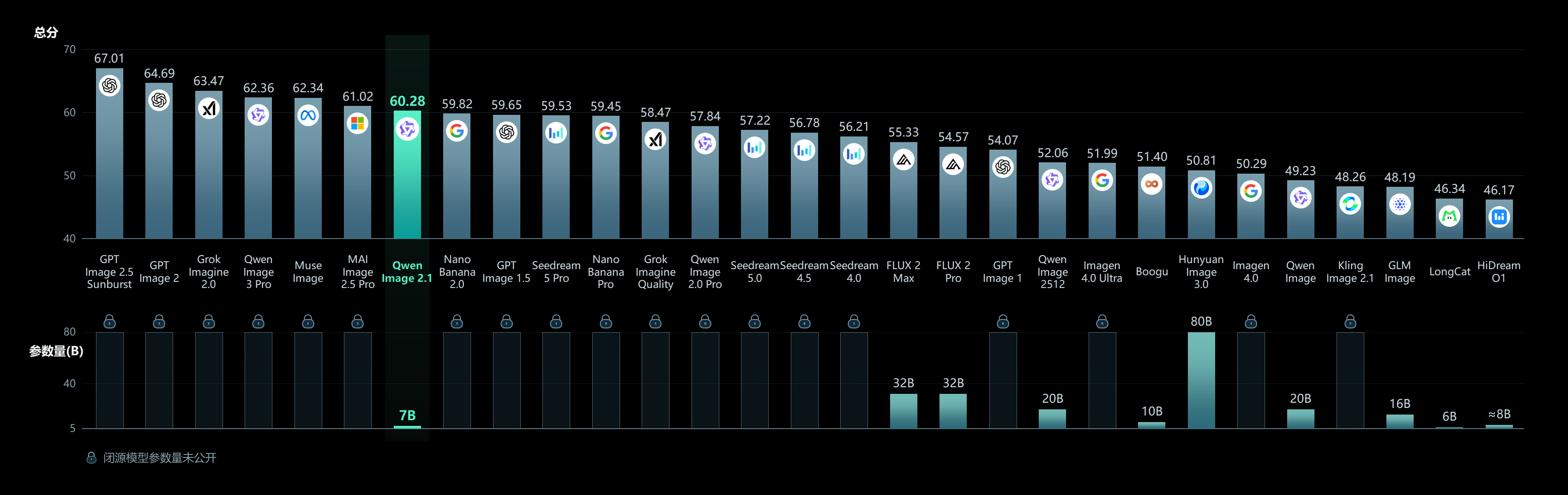
- 2026.10.09: We released Qwen-Image-2.1-Turbo for image generation and editing in just 8 denoising steps. Get started with the Turbo example below.
- 2026.10.09: Qwen-Image-2.1 Pro and Turbo APIs are now officially live! Explore the Pro API and Turbo API on Alibaba Cloud Model Studio.
- 2026.09.20: We released Qwen-Image-2.1! Check our Blog for more details. Weights available at HuggingFace and ModelScope.
- 2026.09.20: Diffusers supports Qwen-Image-2.1 from Day 0 via
QwenImage21Pipeline. See PR #14804. - 2026.09.20: ComfyUI natively supports Qwen-Image-2.1 from Day 0. Compatible weights at Comfy-Org/Qwen-Image-2.1, with example workflows for text-to-image and image editing.
- 2026.09.20: vLLM-Omni supports high-performance Qwen-Image-2.1 inference from Day 0, with step-wise execution, prefix KV caching, CUDA Graph decode, FP8 quantization, and TP/Ulysses parallelism.
- 2026.09.20: SGLang provides Day-0 native support for Qwen-Image-2.1, including prefix caching, Cache-DiT, CUDA graphs, TP/Ulysses/Ring/CFG parallelism, and component offload. See PR #39983.
- 2026.09.20: LightX2V delivers Day 0 acceleration for Qwen-Image-2.1! Check out the usage guide for more details.
Qwen-Image-2.1 Pro and Turbo APIs are officially available for image generation and editing in your applications. Use the hosted APIs, or run the Turbo checkpoint in your own environment with Diffusers.
Visit the Qwen-Image-2.1 Pro API page or Qwen-Image-2.1 Turbo API page for access and usage details.
pip install torch>=2.4.0
pip install transformers>=5.17
pip install git+https://github.com/huggingface/diffusers
pip install accelerate
pip install pillowTurbo uses the same 7B visual generation architecture as Qwen-Image-2.1 and supports text-to-image generation and image editing with 8 denoising steps. The checkpoint includes its recommended sampling schedule, which Diffusers loads automatically.
Use the latest Diffusers source installed above, which includes support for pipeline-configured sampling sigmas.
import torch
from diffusers.utils import load_image
from diffusers import QwenImage21Pipeline

pipe = QwenImage21Pipeline.from_pretrained(
    "Qwen/Qwen-Image-2.1-Turbo", dtype=torch.bfloat16
).to("cuda")

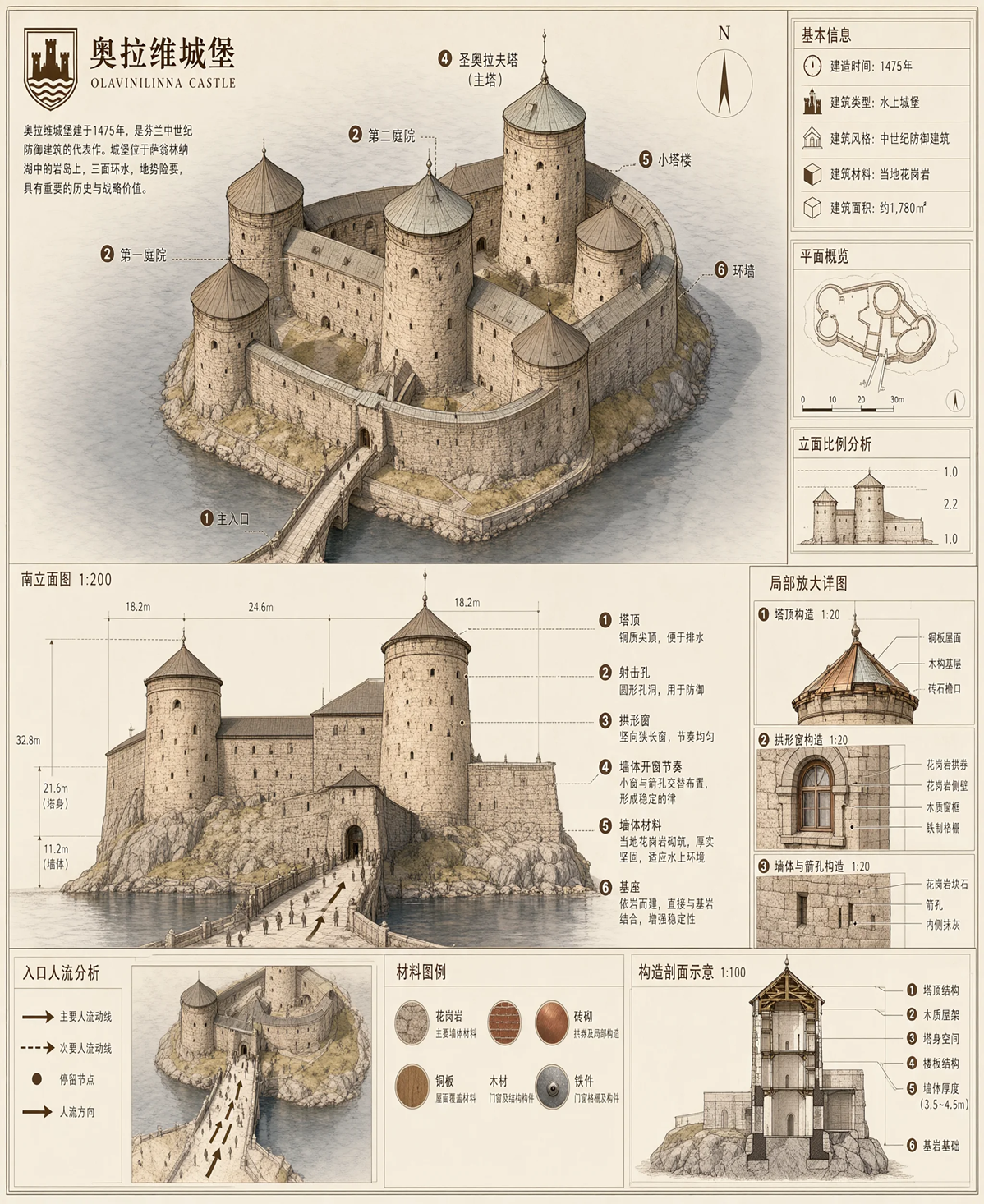
prompt = "A vertically oriented educational chemistry study poster fills the frame, designed like a hand-drawn classroom notes page with a clean white background, thick dark navy-blue outer border, and thin inner navy rectangular border lines. The overall aesthetic is colorful, high-contrast, and hand-lettered in a signature Topper style using marker and watercolor effects. At the top left, a small header in black handwriting reads \"Topper’s Notes\", accented by short decorative navy strokes radiating from it. Centered across the top is the main lesson heading in large stylized black-and-yellow bold lettering: \"Science – Chapter 1:\" followed below by the much larger title \"Chemical Reactions and Equations\". The title has energetic yellow highlighter strokes underneath and small sparkle doodles nearby. At the top right, inside a small outlined page-number box, the label reads \"Page X\". Below the header, a wide rounded rectangle framed in dark navy contains a pink brush-stroke highlight banner with the subheading \"IMPORTANT CHEMICAL EQUATION:\" in black. Inside the same equation panel, the reaction is written very large as \"Fe + CuSO₄ → FeSO₄ + Cu\". The symbol \"Fe\" is highlighted in bright orange with an underline, \"CuSO₄\" is vivid blue and underlined, \"FeSO₄\" is bright green and underlined, and \"Cu\" is metallic bronze and underlined. Beneath the left side of the equation is a lavender rounded label connected by a leader line to the iron component; it says \"Reactants\" and below it \"(before the reaction)\", with \"Reactants\" colored purple and underlined. Beneath the right side is a matching pale-green rounded label connected by a leader line to the products; it says \"Products\" and below it \"(after the reaction)\", with \"Products\" colored green and underlined. Along the lower part of this equation box are stylized ball-and-stick molecule models and atomic orbital drawings: a silver-gray sphere labeled \"Fe\" sits left of center, another cluster shows gray, red, and white spheres representing sulfate groups around blue and green atoms, and a copper-colored sphere appears near the right. Small atom-and-orbit icons sit along the bottom edge of the panel in blue, green, and brown outline styles. The middle portion is enclosed by a large dashed green rounded rectangle titled \"REACTIVITY CONCEPT\" in green uppercase letters with decorative rays. On the left side of this section, a stepped vertical reactivity-series ladder is drawn with alternating colored horizontal blocks. From top to bottom it lists \"K\", \"Na\", \"Ca\", \"Mg\", \"Al\", \"Zn\", \"Fe\" with a green oval callout reading \"(More reactive)\", then continues downward with \"Cu\", \"Ag\", \"Hg\", \"Pt\", \"Au\" with an orange oval callout reading \"(Less reactive)\". Each step is marked by a dark upward-pointing triangular arrow, showing decreasing reactivity downward. In the central-right area, full body text as follows: \"Iron (Fe) is higher in the reactivity series than Copper (Cu). This makes Iron more reactive.\" Below this definition is a visual arrow sequence of overlapping circles: orange \"Fe\" overlaps blue \"Cu\", followed by a red arrow pointing toward the phrase \"→ More displacement ↓ less reactivity\". Under it, a prominent statement in dark handwriting reads \"More reactive element displaces less reactive element\", emphasized with a bright pink marker underline. On the right, a shield-like badge with a navy outline and light interior contains the bold contrasting font label \"DISPLACEMENT REACTION\". Below the badge, full body text as follows: \"A more reactive element displaces a less reactive element from its compound.\" The badge includes an internal miniature illustration of circular electron shells and colored particles, reinforcing the chemistry theme. Directly below the reactivity concept box, a smaller rounded rectangular table titled \"PROPERTY COMPARISON\" compares Iron and Copper. The table has three columns: \"IRON (Fe)\", \"COPPER (Cu)\", and a central property column. Row one reads \"Reactivity series position\" with Iron shown as \"Higher (more reactive)\" and Copper shown as \"Lower (less reactive)\". Row two reads \"Displaces hydrogen from acids\" with Iron marked \"Yes\" and Copper marked \"No\". Row three reads \"Displaced by other metals\" with Iron shown as \"Displaced by Zn, Mg, Al, etc.\" and Copper shown as \"Displaced by Fe, Zn, Mg, etc.\". Row four reads \"Oxidation tendency\" with Iron shown as \"Gets oxidized easily\" and Copper shown as \"Does not get oxidized easily\". Row five reads \"Useful property\" with Iron described as \"Used where strength & corrosion resistance needed\" and Copper described as \"Used where conductivity & corrosion resistance needed\". The table uses thin navy grid lines, orange tinting for the iron column, pale blue tinting for the copper column, black condensed handwriting, and green checkmarks next to positive traits and red crosses next to limitations. The lower half introduces a large illustrated experiment section with a cream highlight behind the title \"BEFORE/AFTER IRON NAIL EXPERIMENT\" in bold dark navy uppercase letters. The section is split visually into a left \"Before\" state and a right \"After\" state. On the left, a beaker filled with bright blue solution contains a shiny silver iron nail standing diagonally. The beaker label reads \"CuSO₄(aq)\" in blue, and the bottom label near the nail reads \"Fe(s)\". A rounded annotation box beside the beaker says \"Initial State: Blue Solution & Silver Nail\". Two glass test tubes stand to the right of this beaker: the upper test tube is filled with blue solution and labeled \"CuSO₄(aq)\", while the lower one contains a pale green liquid. Red and blue directional arrows connect these visual elements to explanations: one red arrow points toward the nail with the text \"Copper gets deposited\", and one blue arrow points toward the liquid with the text \"Solution turns pale green\". On the right side of the experiment section, another beaker shows the after state with the iron nail now coated in brown copper deposits. Its solution is faded to a pale greenish-blue, and the beaker label reads \"FeSO₄(aq)\" in green. A nearby rounded annotation box says \"Final State: Pale Green Solution & Brown Coated Nail\". To the far right are additional test tubes and ion symbols: a test tube containing blue liquid labeled \"CuSO₄(aq)\" with the note \"Blue colour due to Cu²⁺ ions\", and a lower test tube containing pale green liquid labeled \"FeSO₄(aq)\" with the note \"Pale green due to Fe²⁺ ions\". Beside them are ion diagrams labeled \"Cu²⁺(aq)\" and \"Fe²⁺(aq)\", shown as colored charged particles encircled by simple electron-shell rings; the copper ion uses blue particles and the iron ion uses green particles. Small sparkles, arrows, and dashed guide lines emphasize the transformation from blue copper sulfate solution to pale green iron sulfate solution. Near the bottom, a horizontal summary strip has a blue star icon followed by the heading \"SUMMARY\". Full body text as follows: \"In this reaction, Iron (Fe) displaces Copper (Cu) from Copper Sulphate (CuSO₄) solution to form Iron(II) Sulphate (FeSO₄) solution and Copper (Cu).\" To the lower left, a bordered key-points box titled \"KEY POINTS\" lists three starred bullet statements: \"Iron is above copper in the reactivity series.\", \"Fe displaces Cu from CuSO₄ solution.\", and \"Result: Blue solution turns pale green; copper metal deposits on iron nail.\" At the very bottom, inside the footer border, spaced text reads \"CHEMISTRY • CHANGE IS EVERYWHERE • TOPPER’S NOTES\", flanked by small leaf-like ornaments and thin horizontal divider lines. The entire page uses dark navy borders and headings, bright highlighter strokes, watercolor shading, realistic glassware illustrations, and playful scientific doodles to present a chemistry lesson clearly and attractively."

image = pipe(
    prompt=prompt,
    width=1680,
    height=2512,
    use_kv_cache=True,
    generator=torch.Generator("cpu").manual_seed(42),
).images[0]

image.save("turbo_t2i.png")

input_image = load_image(
    'https://huggingface.co/Qwen/Qwen-Image-2.1-Turbo/resolve/main/assets/turbo-boat-input.png'
).convert("RGBA")

edit_prompt = "Create a photorealistic photograph of the motor yacht from the input sketch, sailing on open sea, captured in full side profile with the camera at water level. Build the vessel with the structure shown in the input sketch: a long low hull; one tall mast stepped forward with a small cross-tree platform near its top; a wheelhouse superstructure with an open bridge wing just behind the mast; a midships deckhouse carrying a row of four rectangular windows with a lifeboat stowed on its roof; a rectangular funnel behind that deckhouse; an aft deckhouse with a row of three rectangular windows and a second lifeboat above it; thin railings along every deck edge; the hull side pierced by one small square window at the bow, an upper line of five round portholes on the raised forward section, and a lower line of nine round portholes along the main hull. Paint the hull black, the superstructures and the mast white, and the funnel yellow. Set the yacht broadside on a calm deep-blue sea with a low gentle swell and a thin white wake trailing from the bow, the straight horizon crossing behind the funnel top, under a clear sky with soft scattered clouds; sunlight from the front left lights the white superstructures and leaves a bright reflection path on the water beside the hull with a soft contact shadow along the waterline; the entire vessel fits inside the frame with open water in the foreground and sky above."

edited_image = pipe(
    prompt=edit_prompt,
    image=input_image,
    width=2048,
    height=2048,
    use_kv_cache=True,
    generator=torch.Generator("cpu").manual_seed(43),
).images[0]

edited_image.save("turbo_edit.png")
The editing example loads a yacht sketch and turns it into a photorealistic image. Both calls use the saved 8-step schedule and the default CFG=1 setting. Setting num_inference_steps alone does not override Turbo's saved schedule. See the Turbo model card for more details.
The following examples use the original Qwen-Image-2.1 checkpoint.
import torch
from diffusers import QwenImage21Pipeline

pipe = QwenImage21Pipeline.from_pretrained(
    "Qwen/Qwen-Image-2.1", torch_dtype=torch.bfloat16
).to("cuda")

prompt = "A vertically oriented educational chemistry study poster fills the frame, designed like a hand-drawn classroom notes page with a clean white background, thick dark navy-blue outer border, and thin inner navy rectangular border lines. The overall aesthetic is colorful, high-contrast, and hand-lettered in a signature Topper style using marker and watercolor effects. At the top left, a small header in black handwriting reads \"Topper’s Notes\", accented by short decorative navy strokes radiating from it. Centered across the top is the main lesson heading in large stylized black-and-yellow bold lettering: \"Science – Chapter 1:\" followed below by the much larger title \"Chemical Reactions and Equations\". The title has energetic yellow highlighter strokes underneath and small sparkle doodles nearby. At the top right, inside a small outlined page-number box, the label reads \"Page X\". Below the header, a wide rounded rectangle framed in dark navy contains a pink brush-stroke highlight banner with the subheading \"IMPORTANT CHEMICAL EQUATION:\" in black. Inside the same equation panel, the reaction is written very large as \"Fe + CuSO₄ → FeSO₄ + Cu\". The symbol \"Fe\" is highlighted in bright orange with an underline, \"CuSO₄\" is vivid blue and underlined, \"FeSO₄\" is bright green and underlined, and \"Cu\" is metallic bronze and underlined. Beneath the left side of the equation is a lavender rounded label connected by a leader line to the iron component; it says \"Reactants\" and below it \"(before the reaction)\", with \"Reactants\" colored purple and underlined. Beneath the right side is a matching pale-green rounded label connected by a leader line to the products; it says \"Products\" and below it \"(after the reaction)\", with \"Products\" colored green and underlined. Along the lower part of this equation box are stylized ball-and-stick molecule models and atomic orbital drawings: a silver-gray sphere labeled \"Fe\" sits left of center, another cluster shows gray, red, and white spheres representing sulfate groups around blue and green atoms, and a copper-colored sphere appears near the right. Small atom-and-orbit icons sit along the bottom edge of the panel in blue, green, and brown outline styles. The middle portion is enclosed by a large dashed green rounded rectangle titled \"REACTIVITY CONCEPT\" in green uppercase letters with decorative rays. On the left side of this section, a stepped vertical reactivity-series ladder is drawn with alternating colored horizontal blocks. From top to bottom it lists \"K\", \"Na\", \"Ca\", \"Mg\", \"Al\", \"Zn\", \"Fe\" with a green oval callout reading \"(More reactive)\", then continues downward with \"Cu\", \"Ag\", \"Hg\", \"Pt\", \"Au\" with an orange oval callout reading \"(Less reactive)\". Each step is marked by a dark upward-pointing triangular arrow, showing decreasing reactivity downward. In the central-right area, full body text as follows: \"Iron (Fe) is higher in the reactivity series than Copper (Cu). This makes Iron more reactive.\" Below this definition is a visual arrow sequence of overlapping circles: orange \"Fe\" overlaps blue \"Cu\", followed by a red arrow pointing toward the phrase \"→ More displacement ↓ less reactivity\". Under it, a prominent statement in dark handwriting reads \"More reactive element displaces less reactive element\", emphasized with a bright pink marker underline. On the right, a shield-like badge with a navy outline and light interior contains the bold contrasting font label \"DISPLACEMENT REACTION\". Below the badge, full body text as follows: \"A more reactive element displaces a less reactive element from its compound.\" The badge includes an internal miniature illustration of circular electron shells and colored particles, reinforcing the chemistry theme. Directly below the reactivity concept box, a smaller rounded rectangular table titled \"PROPERTY COMPARISON\" compares Iron and Copper. The table has three columns: \"IRON (Fe)\", \"COPPER (Cu)\", and a central property column. Row one reads \"Reactivity series position\" with Iron shown as \"Higher (more reactive)\" and Copper shown as \"Lower (less reactive)\". Row two reads \"Displaces hydrogen from acids\" with Iron marked \"Yes\" and Copper marked \"No\". Row three reads \"Displaced by other metals\" with Iron shown as \"Displaced by Zn, Mg, Al, etc.\" and Copper shown as \"Displaced by Fe, Zn, Mg, etc.\". Row four reads \"Oxidation tendency\" with Iron shown as \"Gets oxidized easily\" and Copper shown as \"Does not get oxidized easily\". Row five reads \"Useful property\" with Iron described as \"Used where strength & corrosion resistance needed\" and Copper described as \"Used where conductivity & corrosion resistance needed\". The table uses thin navy grid lines, orange tinting for the iron column, pale blue tinting for the copper column, black condensed handwriting, and green checkmarks next to positive traits and red crosses next to limitations. The lower half introduces a large illustrated experiment section with a cream highlight behind the title \"BEFORE/AFTER IRON NAIL EXPERIMENT\" in bold dark navy uppercase letters. The section is split visually into a left \"Before\" state and a right \"After\" state. On the left, a beaker filled with bright blue solution contains a shiny silver iron nail standing diagonally. The beaker label reads \"CuSO₄(aq)\" in blue, and the bottom label near the nail reads \"Fe(s)\". A rounded annotation box beside the beaker says \"Initial State: Blue Solution & Silver Nail\". Two glass test tubes stand to the right of this beaker: the upper test tube is filled with blue solution and labeled \"CuSO₄(aq)\", while the lower one contains a pale green liquid. Red and blue directional arrows connect these visual elements to explanations: one red arrow points toward the nail with the text \"Copper gets deposited\", and one blue arrow points toward the liquid with the text \"Solution turns pale green\". On the right side of the experiment section, another beaker shows the after state with the iron nail now coated in brown copper deposits. Its solution is faded to a pale greenish-blue, and the beaker label reads \"FeSO₄(aq)\" in green. A nearby rounded annotation box says \"Final State: Pale Green Solution & Brown Coated Nail\". To the far right are additional test tubes and ion symbols: a test tube containing blue liquid labeled \"CuSO₄(aq)\" with the note \"Blue colour due to Cu²⁺ ions\", and a lower test tube containing pale green liquid labeled \"FeSO₄(aq)\" with the note \"Pale green due to Fe²⁺ ions\". Beside them are ion diagrams labeled \"Cu²⁺(aq)\" and \"Fe²⁺(aq)\", shown as colored charged particles encircled by simple electron-shell rings; the copper ion uses blue particles and the iron ion uses green particles. Small sparkles, arrows, and dashed guide lines emphasize the transformation from blue copper sulfate solution to pale green iron sulfate solution. Near the bottom, a horizontal summary strip has a blue star icon followed by the heading \"SUMMARY\". Full body text as follows: \"In this reaction, Iron (Fe) displaces Copper (Cu) from Copper Sulphate (CuSO₄) solution to form Iron(II) Sulphate (FeSO₄) solution and Copper (Cu).\" To the lower left, a bordered key-points box titled \"KEY POINTS\" lists three starred bullet statements: \"Iron is above copper in the reactivity series.\", \"Fe displaces Cu from CuSO₄ solution.\", and \"Result: Blue solution turns pale green; copper metal deposits on iron nail.\" At the very bottom, inside the footer border, spaced text reads \"CHEMISTRY • CHANGE IS EVERYWHERE • TOPPER’S NOTES\", flanked by small leaf-like ornaments and thin horizontal divider lines. The entire page uses dark navy borders and headings, bright highlighter strokes, watercolor shading, realistic glassware illustrations, and playful scientific doodles to present a chemistry lesson clearly and attractively."

image = pipe(
    prompt=prompt,
    width=1680,
    height=2512,
    num_inference_steps=40,
    generator=torch.Generator("cuda").manual_seed(42),
).images[0]

image.save("t2i_example.png")import torch
from diffusers.utils import load_image
from diffusers import QwenImage21Pipeline
pipe = QwenImage21Pipeline.from_pretrained(
"Qwen/Qwen-Image-2.1", torch_dtype=torch.bfloat16
).to("cuda")
input_image = load_image(
'https://huggingface.co/Qwen/Qwen-Image-2.1-Turbo/resolve/main/assets/turbo-boat-input.png'
).convert("RGBA")
edit_prompt = "Create a photorealistic photograph of the motor yacht from the input sketch, sailing on open sea, captured in full side profile with the camera at water level. Build the vessel with the structure shown in the input sketch: a long low hull; one tall mast stepped forward with a small cross-tree platform near its top; a wheelhouse superstructure with an open bridge wing just behind the mast; a midships deckhouse carrying a row of four rectangular windows with a lifeboat stowed on its roof; a rectangular funnel behind that deckhouse; an aft deckhouse with a row of three rectangular windows and a second lifeboat above it; thin railings along every deck edge; the hull side pierced by one small square window at the bow, an upper line of five round portholes on the raised forward section, and a lower line of nine round portholes along the main hull. Paint the hull black, the superstructures and the mast white, and the funnel yellow. Set the yacht broadside on a calm deep-blue sea with a low gentle swell and a thin white wake trailing from the bow, the straight horizon crossing behind the funnel top, under a clear sky with soft scattered clouds; sunlight from the front left lights the white superstructures and leaves a bright reflection path on the water beside the hull with a soft contact shadow along the waterline; the entire vessel fits inside the frame with open water in the foreground and sky above."
image = pipe(
prompt=edit_prompt,
image=input_image,
num_inference_steps=40,
generator=torch.Generator("cuda").manual_seed(43),
).images[0]
image.save("edit_example.png")Qwen-Image-2.1 supports up to 10 reference images for multi-subject composition:
import torch
from PIL import Image
from diffusers import QwenImage21Pipeline

pipe = QwenImage21Pipeline.from_pretrained(
    "Qwen/Qwen-Image-2.1", torch_dtype=torch.bfloat16
).to("cuda")

images = [Image.open(f"ref_{i}.png") for i in range(3)]

result = pipe(
    prompt="These three characters are sitting around a campfire in a forest",
    image=images,
    num_inference_steps=40,
    generator=torch.Generator("cuda").manual_seed(43),
).images[0]

result.save("multi_ref_example.png")The model natively generates transparent images. For best results, use the recommended prompt format:
This is an RGBA image with transparency. <your description>. The image has alpha channel and the background is transparent.
import torch
from diffusers import QwenImage21Pipeline

pipe = QwenImage21Pipeline.from_pretrained(
    "Qwen/Qwen-Image-2.1", torch_dtype=torch.bfloat16
).to("cuda")

image = pipe(
    prompt="This is an RGBA image with transparency. A cute cartoon dragon sticker. The image has alpha channel and the background is transparent.",
    num_inference_steps=40,
    generator=torch.Generator("cuda").manual_seed(42),
).images[0]

image.save("transparent_example.png") # Saved as RGBA when the model generates transparencyQwen-Image-2.1 natively supports 2K resolution. Recommended sizes:
aspect_ratios = {
    "1:1":  (2048, 2048),
    "4:3":  (2400, 1792),
    "3:4":  (1792, 2400),
    "3:2":  (2528, 1696),
    "2:3":  (1696, 2528),
    "16:9": (2752, 1536),
    "9:16": (1536, 2752),
}

width, height = aspect_ratios["1:1"]

image = pipe(
    prompt="A panoramic mountain landscape",
    width=width,
    height=height,
    num_inference_steps=40,
).images[0]These defaults apply to the original Qwen-Image-2.1 checkpoint. Turbo uses its saved 8-step schedule; both checkpoints default to the 2048 resolution level.
| Parameter | Default | Notes |
|---|---|---|
num_inference_steps |
40 | Number of denoising steps |
width / height |
2048 × 2048 | Native 2K resolution; see aspect ratio table above |
For best results, we recommend using the official prompt rewriting models to expand short prompts into detailed, high-quality descriptions. Two fine-tuned Qwen3.5-VL 9B checkpoints are provided — one for text-to-image, one for image editing — sharing a unified codebase that auto-detects the mode from input.
The rewriting code and weights are available at:
- T2I: Qwen/Qwen-Image-2.1-PE-T2I
- Edit: Qwen/Qwen-Image-2.1-PE-I2I
- Code:
prompt_rewrite/— unified codebase with--task t2ior--task edit
prompt_rewrite/
├── run_transformers.py       # Local inference, batch size 1
├── run_vllm.py               # vLLM offline batch (recommended at scale)
├── serve.sh + client.py      # vLLM server + client
├── pe_core.py                # Task profiles, parsing, output records
├── requirements.txt
└── data/                     # Example inputs (t2i + edit with images)
cd prompt_rewrite
pip install -r requirements.txt

# vLLM batch (recommended)
python run_vllm.py --task t2i \
    --ckpt Qwen/Qwen-Image-2.1-PE-T2I \
    --input data/t2i_example.jsonl --output out.jsonl

# Or local transformers
python run_transformers.py --task t2i \
    --ckpt Qwen/Qwen-Image-2.1-PE-T2I \
    --input data/t2i_example.jsonl --output out.jsonl
Output:
{
  "rewritten_prompt": "<long detailed English prompt>",
  "wh_ratio": "16:9"
}python run_vllm.py --task edit \
--ckpt Qwen/Qwen-Image-2.1-PE-I2I \
--input data/edit_example.jsonl --output out.jsonlInput format (JSONL):
{"id": "abc123", "prompt": "make the sky sunset", "input_images": ["images/photo.png"]}Output:
{
  "rewritten_prompt": "Replace the daytime sky with a warm sunset ...",
  "wh_ratio": "",
  "ratio_follow": "<image1>"
}wh_ratio— model chose a new aspect ratio (e.g."16:9")ratio_follow— output inherits the specified input image's aspect ratio (e.g."<image1>")
CKPT=Qwen/Qwen-Image-2.1-PE-T2I bash serve.sh
# then:
python client.py --task t2i --model Qwen/Qwen-Image-2.1-PE-T2I \
"a corgi playing guitar in the rain"import json
import torch
from diffusers import QwenImage21Pipeline
WH_RATIO_TO_SIZE = {
"1:1": (2048, 2048), "4:3": (2400, 1792), "3:4": (1792, 2400),
"3:2": (2528, 1696), "2:3": (1696, 2528), "16:9": (2752, 1536),
"9:16": (1536, 2752),
}
# After running the rewriter, read the output
rewrite = {"rewritten_prompt": "...", "wh_ratio": "16:9"} # from run_vllm.py output
prompt = rewrite["rewritten_prompt"]
width, height = WH_RATIO_TO_SIZE.get(rewrite["wh_ratio"], (2048, 2048))
pipe = QwenImage21Pipeline.from_pretrained(
"Qwen/Qwen-Image-2.1", torch_dtype=torch.bfloat16
).to("cuda")
image = pipe(
prompt=prompt,
width=width, height=height,
num_inference_steps=40,
generator=torch.Generator("cuda").manual_seed(42),
).images[0]
image.save("rewritten_example.png")For GPUs with limited memory, use model offloading:
pipe = QwenImage21Pipeline.from_pretrained(
    "Qwen/Qwen-Image-2.1", torch_dtype=torch.bfloat16
)
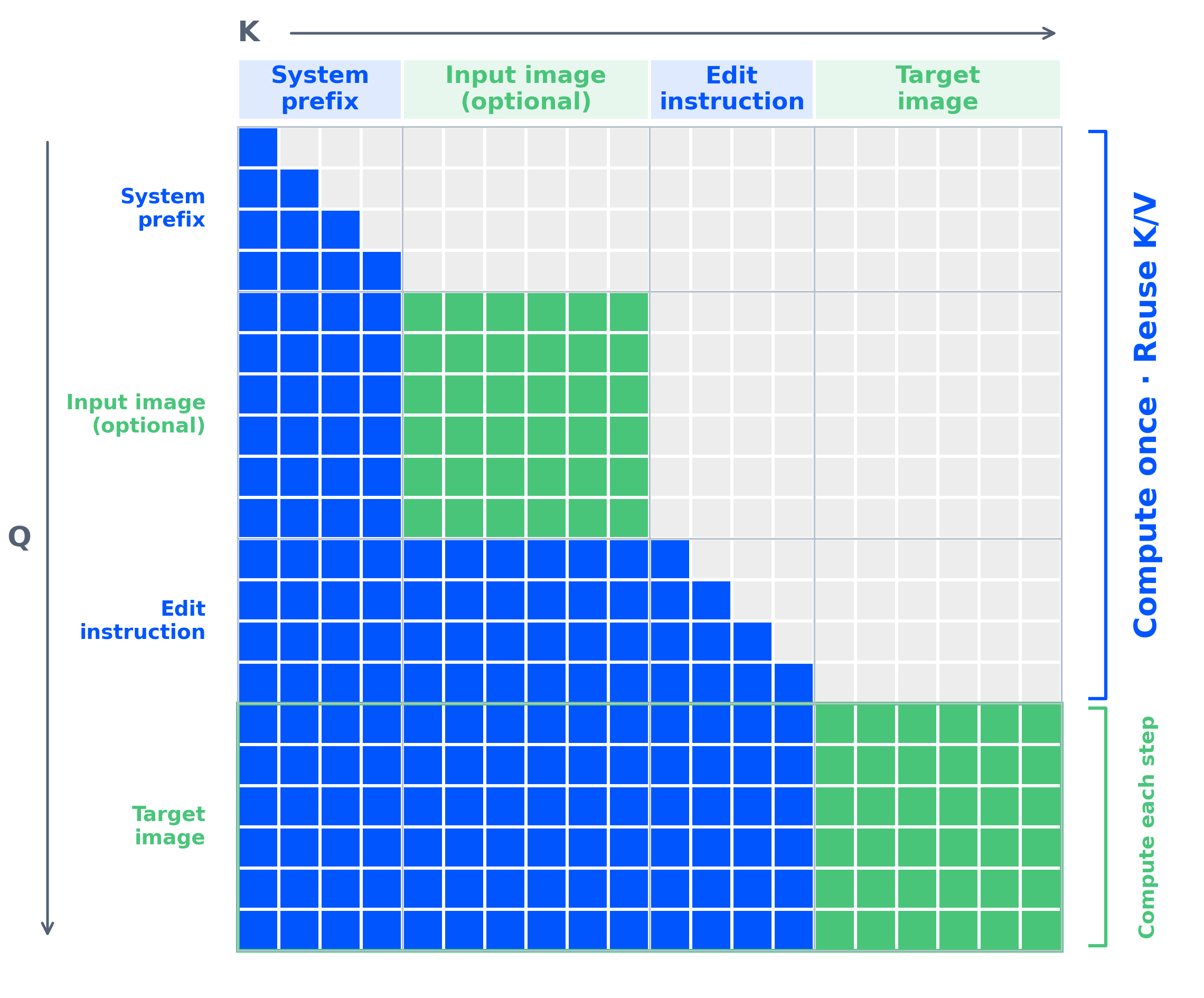
pipe.enable_model_cpu_offload()The transformer automatically caches the text and condition-image prefix across denoising steps when the checkpoint has causal_condition: true (the default). This provides significant speedup for image editing tasks with multiple condition images — the condition context is encoded once and reused for all denoising steps.
vLLM-Omni supports high-performance serving with prefix KV caching, CUDA Graph decode, FP8 quantization, and tensor parallelism.
# Text-to-image
python examples/offline_inference/text_to_image/text_to_image.py \
  --model Qwen/Qwen-Image-2.1 \
  --prompt "A ceramic teapot on a wooden table" \
  --output qwen21_t2i.png \
  --num-inference-steps 40

# Image editing
python examples/offline_inference/image_to_image/image_edit.py \
  --model Qwen/Qwen-Image-2.1 \
  --color-format RGBA \
  --seed 43 \
  --image input.png \
  --prompt "Let this mascot dance under the moon" \
  --output qwen21_edit.png \
--num-inference-steps 40vllm serve Qwen/Qwen-Image-2.1 --omni --port 8091curl http://localhost:8091/v1/images/generations \
-H "Content-Type: application/json" \
-d '{
"model": "Qwen/Qwen-Image-2.1",
"prompt": "A ceramic teapot on a wooden table",
"size": "1024x1024",
"num_inference_steps": 40,
"seed": 42
}'For step-wise execution (batch-level scheduling):
vllm serve Qwen/Qwen-Image-2.1 --omni \
  --port 8091 \
  --step-execution \
  --max-num-seqs 8
See the vLLM-Omni recipe for FP8 quantization, prefix KV cache options, multi-GPU parallelism, and detailed benchmarks.
SGLang-Diffusion provides native, high-performance inference for Qwen-Image 2.1, supporting text-to-image generation, multi-image editing, and transparent RGBA output. It offers multi-GPU parallelism, memory offloading, and optimized kernels across datacenter and consumer GPUs.
Generate a 1024×1024 image:
sglang generate \
  --model-path Qwen/Qwen-Image-2.1 \
  --prompt "A capybara reading a book by candlelight" \
  --height 1024 --width 1024 \
  --num-inference-steps 40 --guidance-scale 1 \
  --seed 42 --save-output
For image editing, add --image-path input.png. See the Qwen-Image 2.1 cookbook for installation, GPU-specific commands, image editing, and transparent-background examples.
LightX2V is a framework for image and video generation models, highly optimized for inference speed and GPU memory efficiency on both data center and consumer GPUs.
LightX2V supports Qwen-Image-2.1 for both text-to-image generation and image editing. See the usage guide to get started.
Qwen-Image-2.1 is a single-stream DiT with the following design:
- Transformer: 32 layers, 7B parameters, single-stream architecture with block-causal attention (
(q_idx >= kv_idx) or same_image_block). Text uses token-level causal mask; images use chunk-level bidirectional mask. - Text Encoder: Qwen3-VL 8B (vision-language model) — encodes both text instructions and condition images into a unified representation.
- VAE: 64-channel RGBA autoencoder with 16× spatial compression, supporting native transparency.
- Scheduler: Flow Matching with Euler discrete scheduling and dynamic shifting.
The mixed-granularity attention architecture enables efficient prefix KV cache reuse: input images and text instructions are computed once at the first denoising step and cached for all subsequent steps.



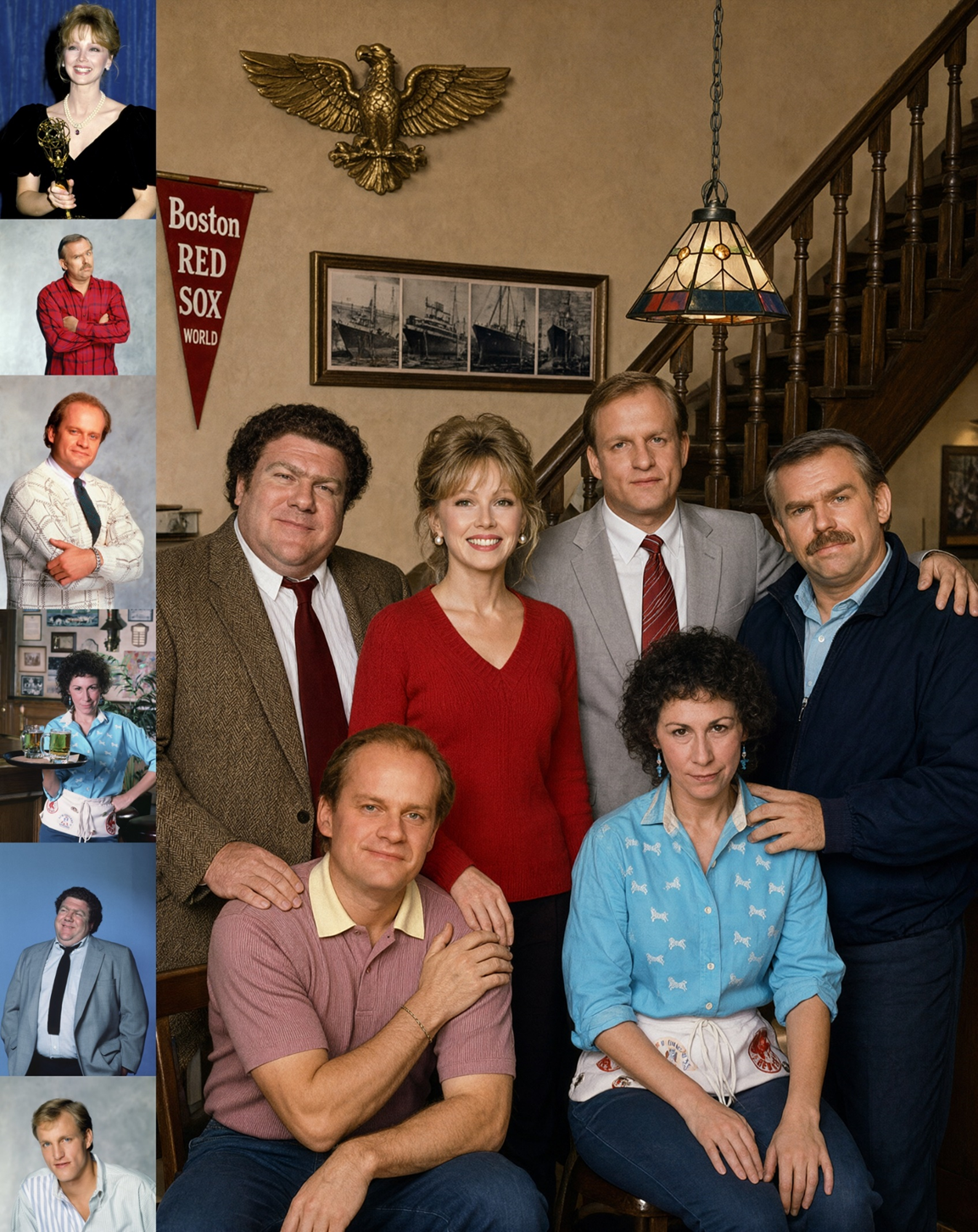
Group photograph generated from six individual portrait references
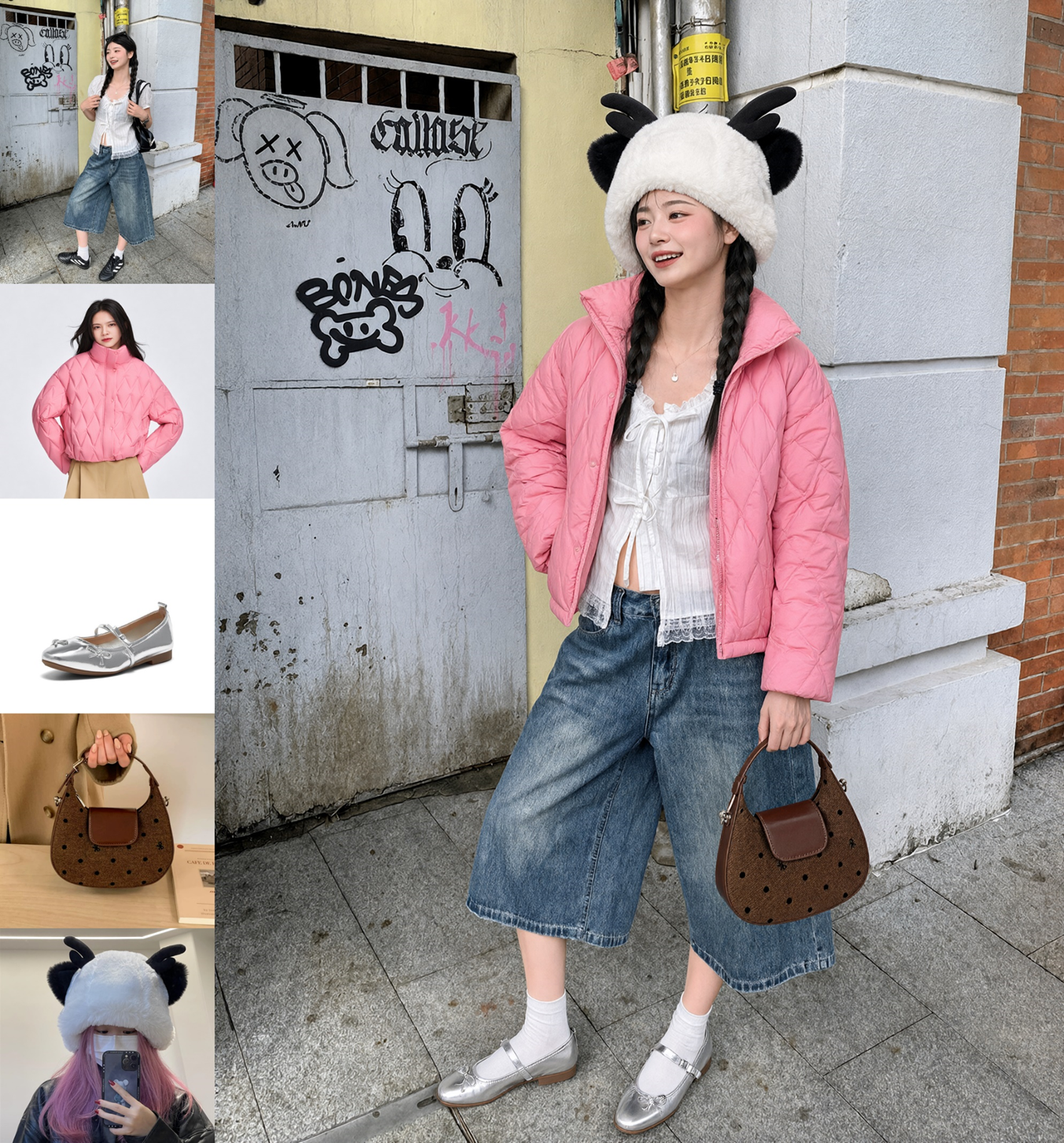
Complete outfit assembled from five reference images (model, clothing, shoes, bag, hat)
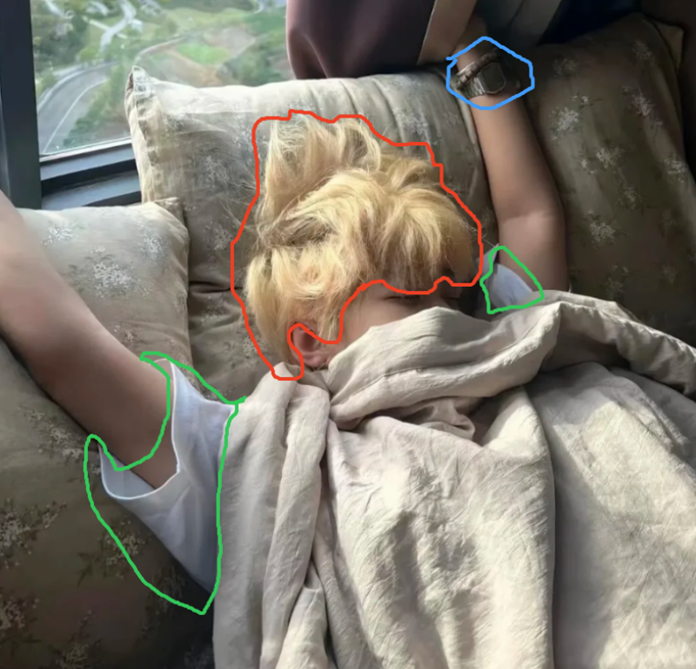

Circle-guided multi-region editing: remove watch, change hair color, replace clothing
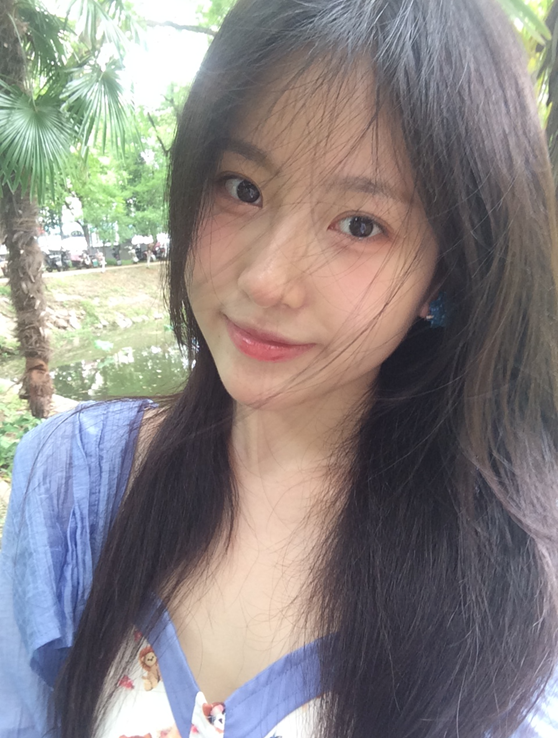
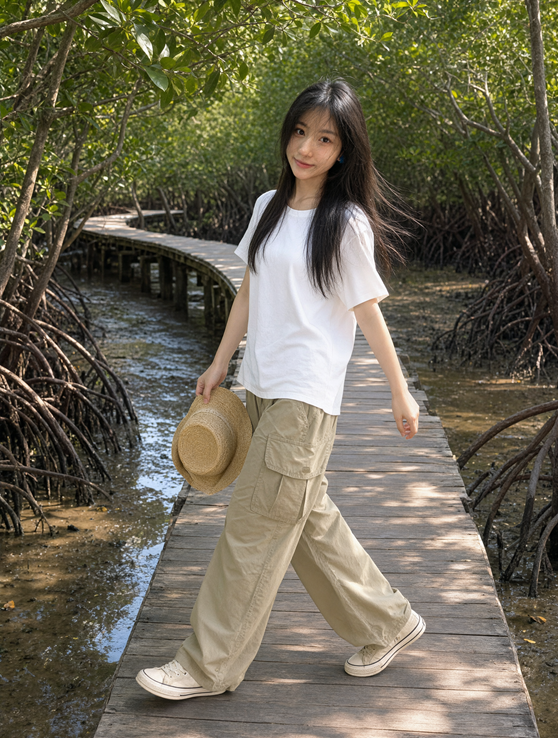
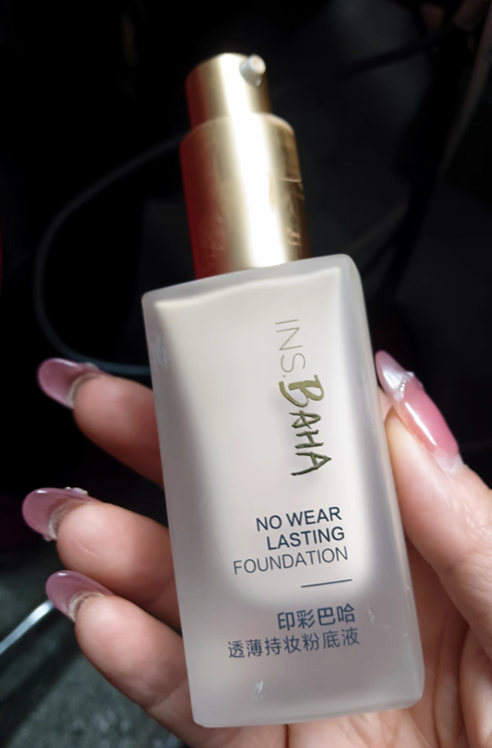

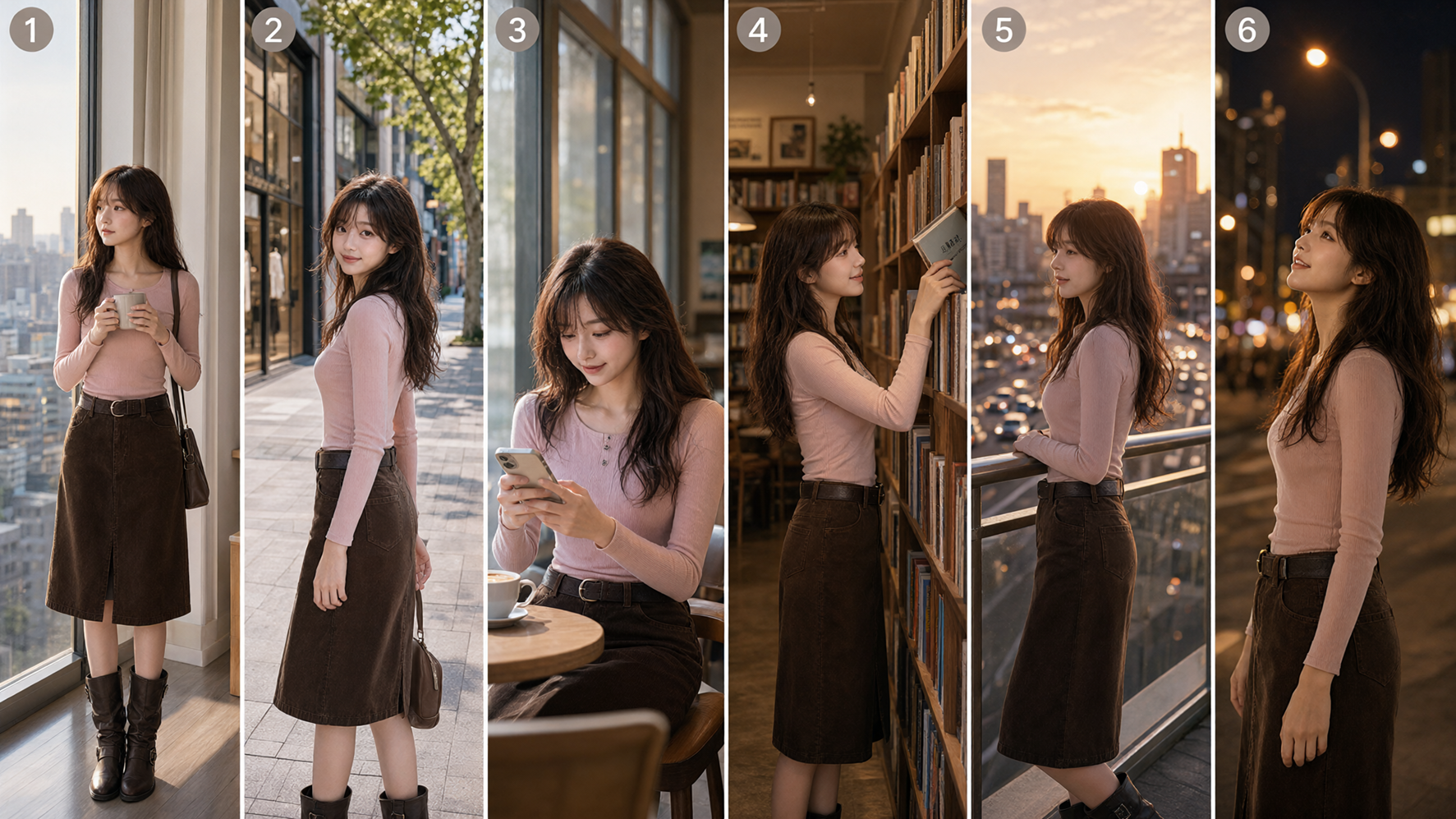
Panorama generated from a selfie
Storyboard generated from a three-view character reference
Diffusers supports Qwen-Image-2.1 via QwenImage21Pipeline, handling both text-to-image and image-conditioned generation in a single pipeline. See PR #14804.
Qwen-Image 2.1 is natively supported in ComfyUI on Day 0. The compatible model weights can be downloaded from Hugging Face Comfy-Org/Qwen-Image-2.1. See example workflows for text-to-image and image editing.
vLLM-Omni accelerates Qwen-Image 2.1 through cross-step prefix KV cache reuse and dedicated CUDA Graphs, reducing redundant computation and kernel launch overhead. Request-level and step-level continuous batching improve GPU utilization and throughput, with phase-aware prefill and decode scheduling. It also supports tensor and Ulysses sequence parallelism, distributed VAE decoding with adaptive OOM recovery, FP8 weights and prefix KV storage, and CPU offloading for varying memory budgets. See the Qwen-Image-2.1 recipe for details.
SGLang-Diffusion provides native, high-performance inference with multi-GPU parallelism, memory offloading, and optimized kernels. See the Qwen-Image 2.1 cookbook and PR #39983.
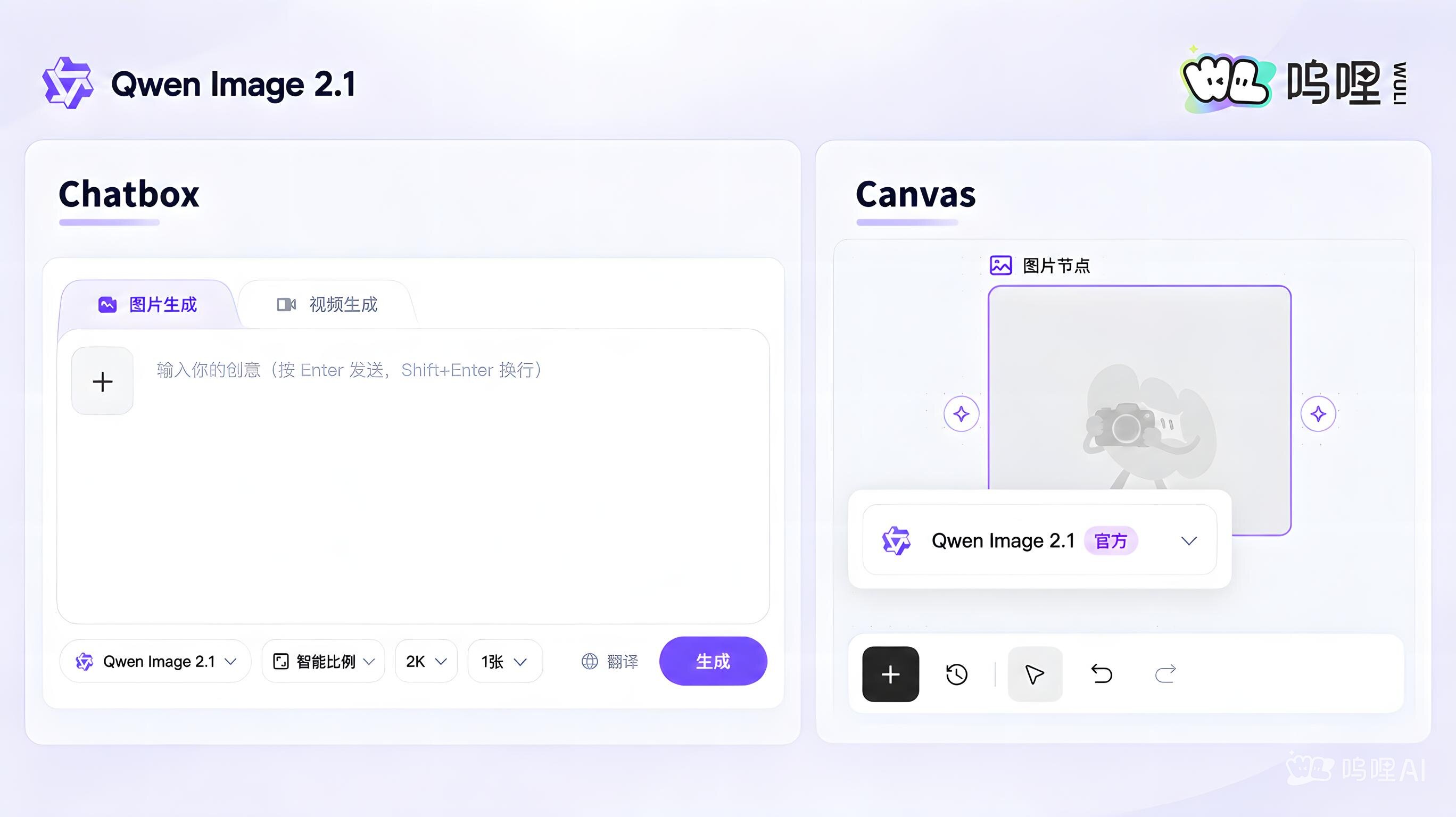
For users in mainland China, wuli.art offers free access to all Qwen Image 2.1 features in both Chatbox and Canvas, including image generations with transparent background.

ModelScope fully supports Qwen-Image-2.1. Built on its open-source DiffSynth-Studio framework, the platform enables seamless model download, online generation and LoRA training. Explore these capabilities at ModelScope Civision.
Get ready to run Qwen-Image 2.1 on AMD Radeon GPU. With ROCm, PyTorch, and Diffusers, developers can easily explore high-quality text-to-image generation on AMD GPUs.
FlagOS is a fully open-source system software stack for heterogeneous AI chips. It unifies the model–system–chip layers to enable a "develop once, run anywhere" workflow, eliminating the fragmentation among vendor-specific software stacks and substantially lowering the cost of porting AI workloads across accelerators.
In this release, Qwen-Image-2.1 leverages the FlagOS software stack to provide direct multi-chip support. By integrating the Triton-based operator library FlagGems via the Torch-FL plugin, FlagOS enables seamless adaptation of the Diffusers library across chip platforms; the usage experience remains identical to that on NVIDIA, requiring zero code modifications. Inference accuracy across all platforms has been aligned with the official implementation.
Prebuilt images and weights for 8 chip platforms are released under FlagRelease — for example, T-Head zhenwu and Arm.
This repository is licensed under the Qwen Research License Agreement.
Having issues with Qwen-Image-2.1? Our official feedback form connects you directly with the Qwen Image research team. Share your prompts, images, or workflows to help us investigate and improve.
If you'd like to get in touch with our research team, join our Discord. We welcome issues and pull requests on GitHub.
If you're passionate about fundamental research, we're hiring full-time employees and research interns. Reach out at fulai.hr@alibaba-inc.com.