


Cross-platform, lightweight clipboard manager written in Rust and GPUI.
English | 简体中文
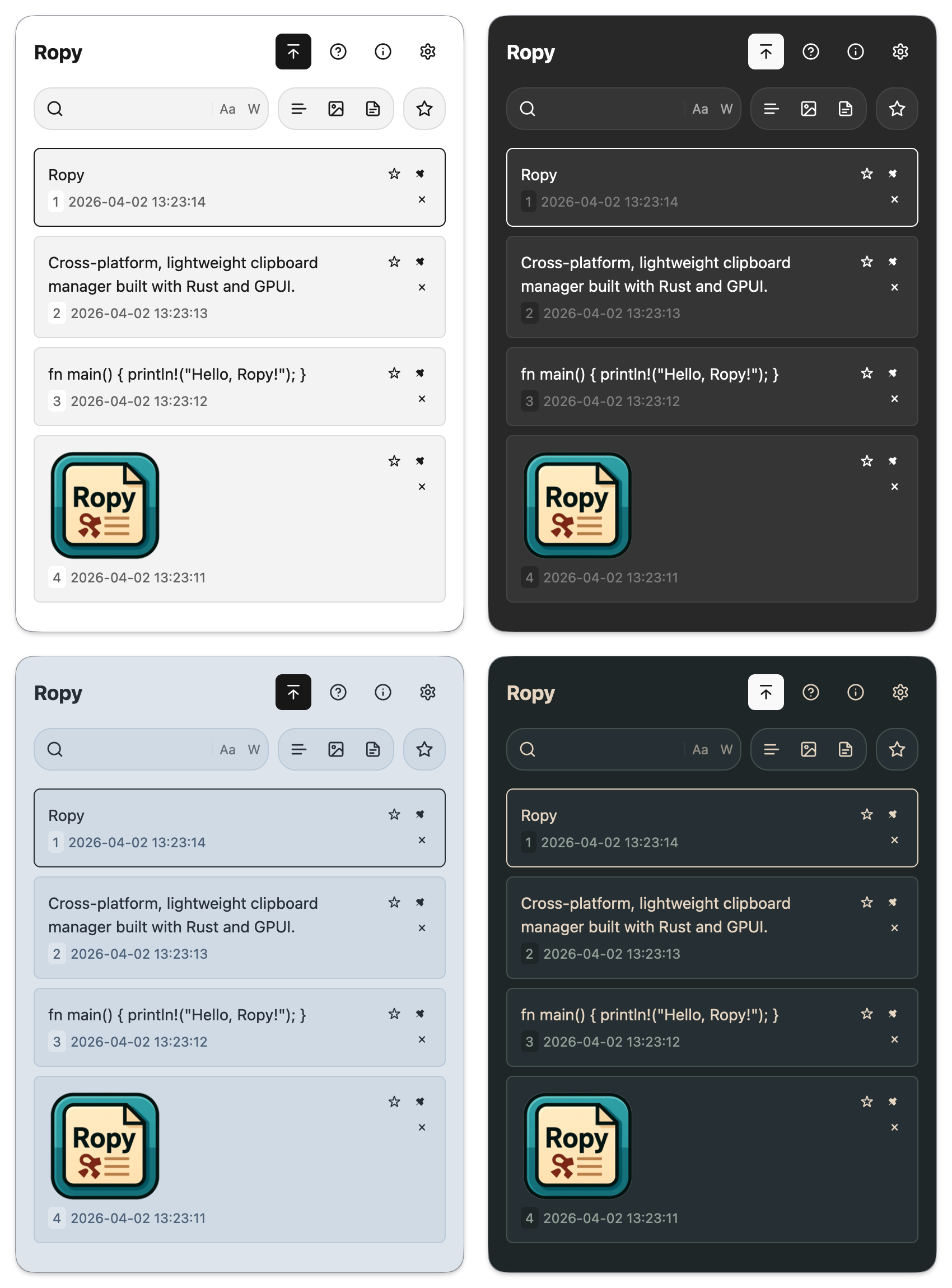
- Native desktop application built with Zed's GPUI.
- Cross-platform support for Windows, macOS, and Linux (X11 and native Wayland), with compositor-dependent clipboard and shortcut capabilities.
- Tracks text, rich text (HTML/RTF), image, and file path clipboard history with content-based deduplication.
- Switchable list and grid layout modes for browsing history.
- Search the loaded history with case-sensitive and whole-word options.
- Favorite and pin records; automatic cleanup preserves pinned and favorited items.
- Preview text and images via configurable hover delay or by holding
Space. - Configurable global hotkey, theme, language, autostart, and confirm mode.
- System tray integration plus in-app update check, download, and install flow.
Download the latest binaries from the Releases page.
Install from the self-hosted Homebrew tap:
brew install --cask studentweis/tap/ropyUpgrade with brew upgrade --cask ropy. In-app update checks remain available;
installation is managed by Homebrew. For the current unsigned release, this
self-hosted Cask automatically removes com.apple.quarantine from the installed
Ropy.app. It preserves other extended attributes and does not sign or notarize
the app. A cleanup failure stops installation and prints an error. If macOS
still blocks launch, review and allow Ropy in System Settings → Privacy & Security.
After downloading the .dmg file and dragging Ropy.app to the Applications folder, you may need to remove the quarantine attribute to run the application without issues. Open Terminal and run the following commands:
xattr -rc /Applications/Ropy.app
sudo xattr -r -d com.apple.quarantine /Applications/Ropy.appYou can install Ropy using Scoop:
scoop bucket add extras
scoop install ropy
Note
Ropy detects standard Scoop installations and leaves installation to Scoop. Use scoop update ropy; in-app update checks remain available.
The current source supports native Wayland windows without XWayland or DISPLAY.
This support was added in PR #234;
check your release's notes when using a pre-built binary.
Run ropy --show to open the history window. On Wayland, use the desktop-approved
GlobalShortcuts portal, the supported Hyprland integration, or bind ropy --show
in your compositor. Tiling compositors may need a floating rule.
Clipboard capture requires data-control support; automatic paste additionally requires virtual-keyboard support. Native Sway has been tested; GNOME, KDE and Niri have not been individually validated. See the Wayland guide for setup, fallback activation and capability limits.
Ensure you have Rust installed (via rustup). Then:
git clone https://github.com/StudentWeis/ropy.git
cd ropy
cargo build --release
./target/release/ropyWith GNU Make, Bash and awk installed (on Windows, use a compatible shell such as MSYS2), run make or make help to list the development commands. Cargo uses the Rust version pinned in rust-toolchain.toml; formatting additionally requires nightly rustfmt (rustup toolchain install nightly --profile minimal --component rustfmt).
make build          # Debug build
make build-release  # Optimized build
make run            # Launch the debug application
make test           # Run tests
make fmt-check      # Verify Rust formatting
make precheck       # Format code and run the complete pre-commit gate
Other targets include check, clippy, fmt, doc and clean. make setup runs scripts/init.sh to install development tools and hk Git hooks (hk 2.5+). Install uv first; YAML, TOML and JSON checks use uvx to run pinned parsers. Setup replaces the existing pre-commit hook. Run hk check --all to check files or hk fix --all to fix them. If a commit hook fixes files, review and stage the changes before committing again. The precheck script requires Python 3 and Clippy (rustup component add clippy). Direct Cargo targets support overrides such as make build CARGO="rtk cargo"; script targets use their existing command selection.
- Launch Ropy — it starts hidden in the system tray and begins recording clipboard history.
- Use the global hotkey or the tray icon to open the history window.
- Press
/to focus search, then refine results with case-sensitive, whole-word, and type filters. - Use
Up/DownorJ/Kto move through items, andEnteror1-5to confirm a selection. - Press
Shift+Enterto paste as plain text when a rich-text record is selected. - In grid mode, use
H/Lto move between columns. - Hold
Spaceto preview the selected record, pressFto favorite it, andDeleteorDto remove it. - Use row actions to pin records so they are excluded from storage cleanup.
- Choose between
copy_to_clipboardandpaste_immediatelyconfirm modes in Settings.
- The system clipboard does not expose the original application source for copied items.
- Plugin/extension system: no current plans — Ropy focuses on simplicity and small footprint.
- Cloud sync: not supported at this time.
- Full command-line history management: Ropy is primarily a GUI application; Linux
ropy --showopens that GUI.
- Inspired by clipboard managers such as Ditto, Maccy and CopyQ.
- Thanks to the Rust community and all upstream projects used by Ropy: GPUI Kit, clipboard-rs, redb and others.