
Modern admin interface for FastAPI with built-in authentication, event tracking, and security features


CRUDAdmin is a robust admin interface generator for FastAPI applications, offering secure authentication, comprehensive event tracking, and essential monitoring features. Built with FastCRUD and HTMX, it helps you create production-ready admin panels with minimal configuration.
Documentation: https://benavlabs.github.io/crudadmin/
Important
v0.6.0: Authentication now runs on crudauth. Upgrading signs every admin out once, logout is a POST, the Memcached session backend is gone, and new admins aren't superusers by default. Read the v0.6.0 release notes before upgrading.
Warning
CRUDAdmin is still experimental. While actively developed and tested, APIs may change between versions. Upgrade with caution in production environments, always carefully reading the changelog.
- 🔒 Session Management: Sessions in memory, Redis or the admin database, built on crudauth, with a Sessions page to sign devices out
- 🛡️ Built-in Security: CSRF protection, login lockout, password confirmation before admin-account changes, IP allowlists, HTTPS enforcement, and secure session cookies (HttpOnly, Secure, SameSite=Strict)
- 👥 Roles: Superusers manage admin accounts and see the event log; other admins work with your models
- 📝 Event Tracking & Audit Logs: Comprehensive audit trails for all admin actions with user attribution
- 📊 Auto-generated Interface: Creates admin UI directly from your SQLAlchemy models with intelligent field detection
- 🔍 Advanced Filtering: Type-aware field filtering, search, and pagination with bulk operations
- 🌗 Modern UI: Clean, responsive interface built with HTMX and FastCRUD
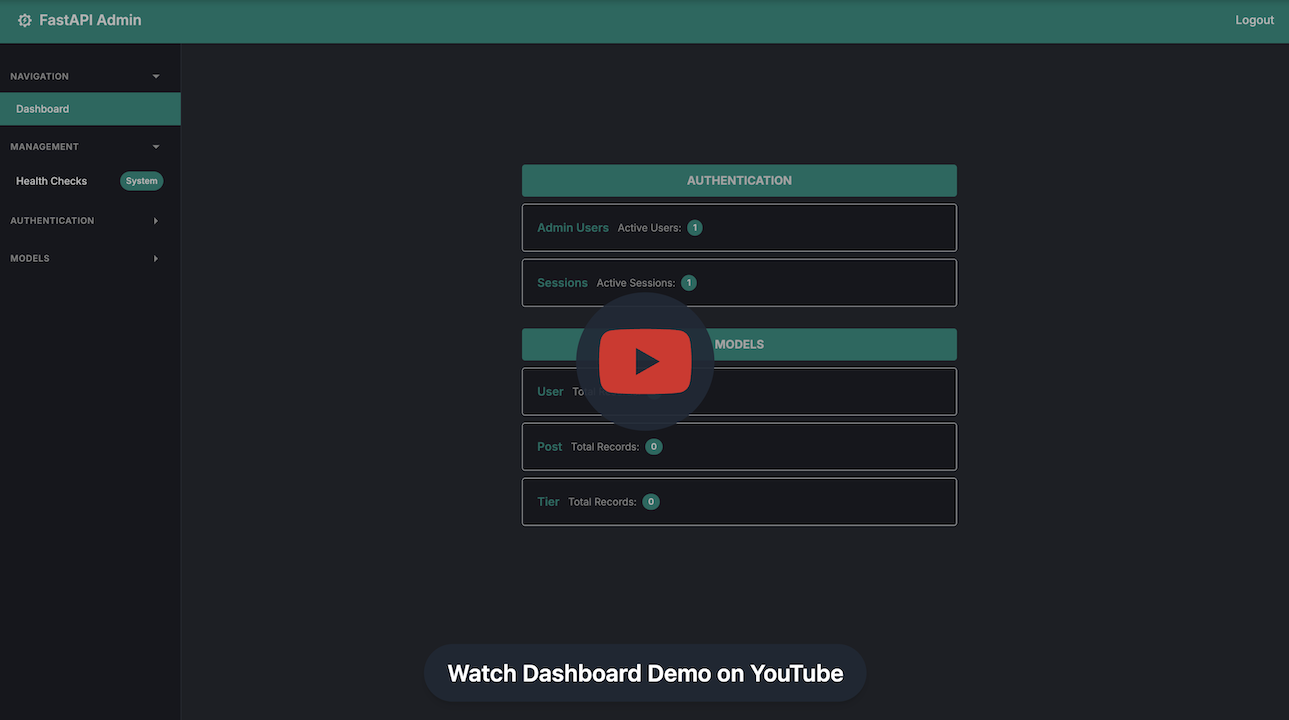
To see what CRUDAdmin dashboard actually looks like in practice, watch the video demo on youtube:
uv add crudadminFor production with Redis sessions:
uv add "crudadmin[redis]"Or using pip:
pip install "crudadmin[redis]"from contextlib import asynccontextmanager
from fastapi import FastAPI
from sqlalchemy.ext.asyncio import AsyncSession, create_async_engine
from crudadmin import CRUDAdmin
from .user import (
Base,
User,
UserCreate,
UserUpdate,
)
engine = create_async_engine("sqlite+aiosqlite:///app.db")
async def get_session():
async with AsyncSession(engine) as session:
yield session
admin = CRUDAdmin(
session=get_session,
SECRET_KEY="your-secret-key-here",
initial_admin={
"username": "admin",
"password": "secure_password123",
},
)
admin.add_view(
model=User,
create_schema=UserCreate,
update_schema=UserUpdate,
allowed_actions={"view", "create", "update"},
)
@asynccontextmanager
async def lifespan(app: FastAPI):
async with engine.begin() as conn:
await conn.run_sync(Base.metadata.create_all)
await admin.initialize()
yield
await admin.shutdown()
app = FastAPI(lifespan=lifespan)
app.mount("/admin", admin.app)SECRET_KEY keys the stored session and CSRF identifiers; changing it signs every admin out. admin.initialize() creates the admin tables and the initial admin, and admin.shutdown() closes the session store.
Navigate to /admin to access your admin interface with:
- User authentication
- CRUD operations for your models
- Responsive UI with dark/light themes
- Built-in security features
Warning
Important for SQLite users: If you're using SQLite databases (which is the default for CRUDAdmin), make sure to add database files to your .gitignore to avoid committing sensitive data like admin credentials and session tokens.
*.db
*.sqlite
*.sqlite3
crudadmin_data/
*.db-journal
*.sqlite3-journalSessions, CSRF tokens and login-lockout counters live in one of three backends.
admin = CRUDAdmin(session=get_session, SECRET_KEY="key")Memory is per process: fine for development and a single worker. With several workers an admin would be logged out whenever a request lands on another worker.
from crudadmin import CRUDAdmin, RedisConfig, SessionConfig

admin = CRUDAdmin(
    session=get_session,
    SECRET_KEY="key",
    sessions=SessionConfig(
        backend="redis", redis=RedisConfig(url="redis://localhost:6379/0")
    ),
)
redis also accepts RedisConfig(host=..., port=..., db=..., password=...) or a plain dict.
admin = CRUDAdmin(
    session=get_session,
    SECRET_KEY="key",
    sessions=SessionConfig(backend="database"),
)
Keeps sessions and lockout counters in the admin database, shared by every worker without extra infrastructure.
from crudadmin import AccessConfig, CRUDAdmin, RedisConfig, SessionConfig

admin = CRUDAdmin(
    session=get_session,
    SECRET_KEY=SECRET_KEY,
    sessions=SessionConfig(
        backend="redis",
        redis=RedisConfig(host="localhost", port=6379, db=0, password="your-redis-password"),
        max_per_admin=3,
        timeout_minutes=15,
        cleanup_interval_minutes=5,
        secure_cookies=True,
    ),
    access=AccessConfig(
        allowed_ips=["10.0.0.1"],
        allowed_networks=["192.168.1.0/24"],
        trusted_proxy_hops=1,
        enforce_https=True,
    ),
    track_events=True,
)
Logins are locked after 5 failures, for one minute at first and at most five. Anyone who knows an admin's username can trigger that, so pair it with allowed_ips / allowed_networks. Set trusted_proxy_hops to the number of reverse proxies in front of the app so lockouts and the allowlist see the real client IP.
| Backend | Use Case | Shared Across Workers | Survives Restarts | Extra Infrastructure |
|---|---|---|---|---|
| Memory | Development, single worker | No | No | None |
| Redis | Production (recommended) | Yes | With Redis persistence | Redis |
| Database | Production without Redis | Yes | Yes | None |
- Secure Authentication - Login with lockout, CSRF-protected changes, and a Sessions page to sign devices out
- Auto-Generated Forms - Create and edit forms built from your Pydantic schemas
- Data Tables - Paginated, sortable tables for viewing your data
- CRUD Operations - Full Create, Read, Update, Delete functionality
- Responsive UI - Works on desktop and mobile devices
- Dark/Light Themes - Toggle between themes
- Input Validation - Built-in validation using your Pydantic schemas
- Event Tracking - Monitor all admin actions with audit trails
- Health Monitoring - Real-time system status and diagnostics
- Quick Start: Get up and running in 5 minutes
- Usage Guide: Complete usage documentation
- API Reference: Full API documentation
- Advanced Topics: Production features and configurations
This project is licensed under the MIT License - see the LICENSE file for details.
Need more than an admin panel? FastroAI is the complete FastAPI SaaS template from the same team: auth, Stripe payments (subscriptions, credits, discounts), entitlements, transactional email, an Astro frontend, and PydanticAI agents, wired together and production-ready.

Ship your SaaS faster with FastroAI →
