Extract encrypted Google Chrome cookies for a url on Mac OS X, Windows, or Linux
@latest
@canary
npm install chrome-cookies-secure
# or
npm install chrome-cookies-secure@canary
- Due to lack of test coverage on Linux & Windows, latest security bumps have been released on
@canary. - Beware there may be instability in this release, but that it comes at the benefit of better security.
- Please raise issues for any bugs you find on the open PR page or open a PR for the
@canarytag.
Because this package is designed to work cross-platform, two operating system specific dependencies are declared as optionalDependencies.
If you are working on these platforms you should install these manually after running npm i.
win-dpapiis requirednpm i win-dpapi@1.1.0
keytaris requirednpm i keytar@7.9.0
url should be a fully qualified url, e.g. https://www.example.com/path
format is optional and can be one of the following values:
| format | description |
|---|---|
| curl | Netscape HTTP Cookie File contents usable by curl and wget |
| jar | cookie jar compatible with [tough-cookie] |
| set-cookie | Array of Set-Cookie header values |
| header | cookie header string, similar to what a browser would send |
| puppeteer | an array of objects that can be loaded into puppeteer using the setCookie(...) method |
| object | (default) Object where key is the cookie name and value is the cookie value. These are written in order so it's possible that duplicate cookie names will be overriden by later values |
If format is not specified, object will be used as the format by default.
Cookie order tries to follow RFC 6265 - Section 5.4, step 2 as best as possible.
const chrome = require('chrome-cookies-secure');
chrome.getCookies('https://www.example.com/path/', function(err, cookies) {
	console.log(cookies);
});
const chrome = require('chrome-cookies-secure');
const cookies = await chrome.getCookiesPromised('https://www.example.com/path/', 'jar')const chrome = require('chrome-cookies-secure');
const puppeteer = require('puppeteer');
const url = 'https://www.yourUrl.com/';
const getCookies = (callback) => {
chrome.getCookies(url, 'puppeteer', function(err, cookies) {
if (err) {
console.log(err, 'error');
return
}
console.log(cookies, 'cookies');
callback(cookies);
}, 'yourProfile') // e.g. 'Profile 2'
}
getCookies(async (cookies) => {
const browser = await puppeteer.launch({
headless: false
});
const page = await browser.newPage();
await page.setCookie(...cookies);
await page.goto(url);
await page.waitFor(1000);
browser.close();
});const chrome = require('chrome-cookies-secure');
const url = 'https://www.yourUrl.com/';
const myFunction = async () => {
const cookies = await chrome.getCookiesPromised(url, 'puppeteer', 'Profile 28')
// ..... Use the cookies
}On OS X, this module requires Keychain Access to read the Google Chrome encryption key. The first time you use it, it will popup this dialog:
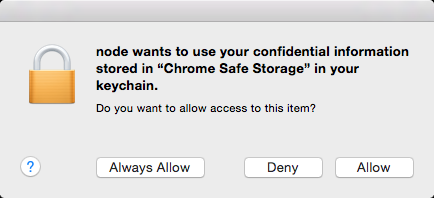
The SQLite database that Google Chrome stores its cookies is only persisted to every 30 seconds or so, so this can explain while you'll see a delay between which cookies your browser has access to and this module.
This software is free to use under the MIT license. See the LICENSE file for license text and copyright information.