




Every window, one hover away.
Live window previews, Alt+Tab switching and keyboard controls for the Dock you already have.

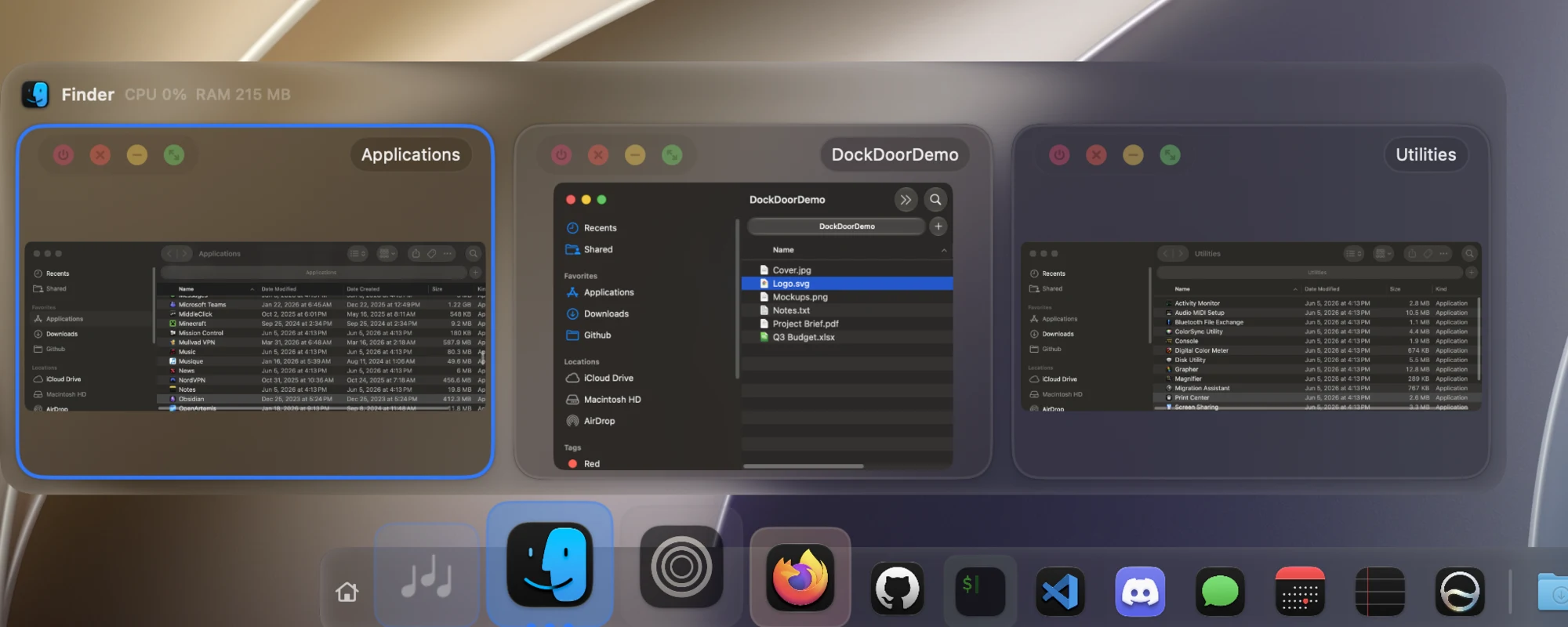
DockDoor brings window previews to the macOS Dock, the way Windows and Linux have had them for years. Hover an app in the Dock to see all of its open windows as live thumbnails, then click one to switch to it, or close, minimize and quit it right from the preview.
It doesn't replace the Dock. DockDoor is a small native app that runs from the menu bar and adds to the Dock that ships with macOS, in Liquid Glass on macOS 26 and later.
See it in motion at dockdoor.net.
- Download DockDoor.dmg
- Or with Homebrew:
brew install --cask dockdoor
Free for macOS 13 Ventura and later, on Apple silicon and Intel. Notarized by Apple, and it keeps itself up to date.
Only download DockDoor from dockdoor.net or this repository's releases.
Hover any app in the Dock to see its windows, including ones on other desktops, other displays, and minimized or hidden ones. Each preview has close, minimize, full screen and quit buttons, and a middle-click closes a window without switching to it.

Hold ⌥ and press Tab to see every open window, not just every app. Press Tab to move through them and release to switch. Type to search, or change the shortcut in Settings.

While you hold ⌘ and Tab, DockDoor shows the highlighted app's windows above the built-in app switcher, so you can pick a specific window.

 Folder Pop Hover a folder in the Dock to see, sort and open what's inside. |
 Music controls Hover an app that's playing audio for a player instead of thumbnails, with synced lyrics for Spotify and Apple Music. |
 Compact list Show an app's windows as a list of titles, all the time or once it has a lot of them. |
 Large previews Make thumbnails bigger to tell similar windows apart. |
Plus:
- Gestures: swipe two fingers on a preview to minimize or maximize a window, scroll on a Dock icon to show or hide an app, or shake a preview to minimize everything else.
- Quick quit: hold ⌘ and right-click a Dock icon to quit the app, or add ⌥ to force quit.
- Calendar: hover Calendar to see the rest of today's events.
- AppleScript and CLI: control previews, the switcher and windows from scripts. See the docs.
Choose Liquid Glass (macOS 26 and later), frosted or clear, and set the preview size, spacing, corners and where the window controls sit.
 |
 |
Nothing leaves your Mac. DockDoor has no servers to send anything to: no analytics, no usage tracking and no crash reporters. Debug logs are written locally and go nowhere unless you export them yourself.
DockDoor Free has no paywall and never will. Every feature in this repo is free, forever.
DockDoor Pro is a separate paid app from the same developer. It replaces the macOS Dock with its own, and buying it is the best way to support DockDoor Free:
- Spring magnification at your display's full refresh rate
- Folders that fan out, a drag-and-drop file tray with AirDrop, and right-click quick actions
- Liquid Glass, frosted or clear materials, profiles, and a different Dock on every display
- Its own window previews and a full Alt+Tab replacement
- A widget marketplace with clock, weather, battery, now playing and community widgets
$20 one-time for 3 Macs. No subscription, 14-day money-back guarantee. If you use Pro, you don't need DockDoor Free.
Parall runs multiple independent instances of the same Mac app, each with its own name and Dock icon. DockDoor and DockDoor Pro recognize apps opened through Parall, so each instance gets its own previews. DockDoor is listed as developer-supported on Parall's compatibility list.
More at dockdoor.net/works-with.
DockDoor is written almost entirely by one developer, with fixes, features and translations from the open-source community.
- 📖 Read CONTRIBUTING.md before opening a pull request
- ⭐ Star it on GitHub to help other people find it
- 🐛 Report a bug or ask for a feature
- 🌍 Translate it on Crowdin
- 💬 Join the Discord
- ❤️ Support development
This project is licensed under the GNU General Public License v3.0 - see the LICENSE file for details.