v1.1
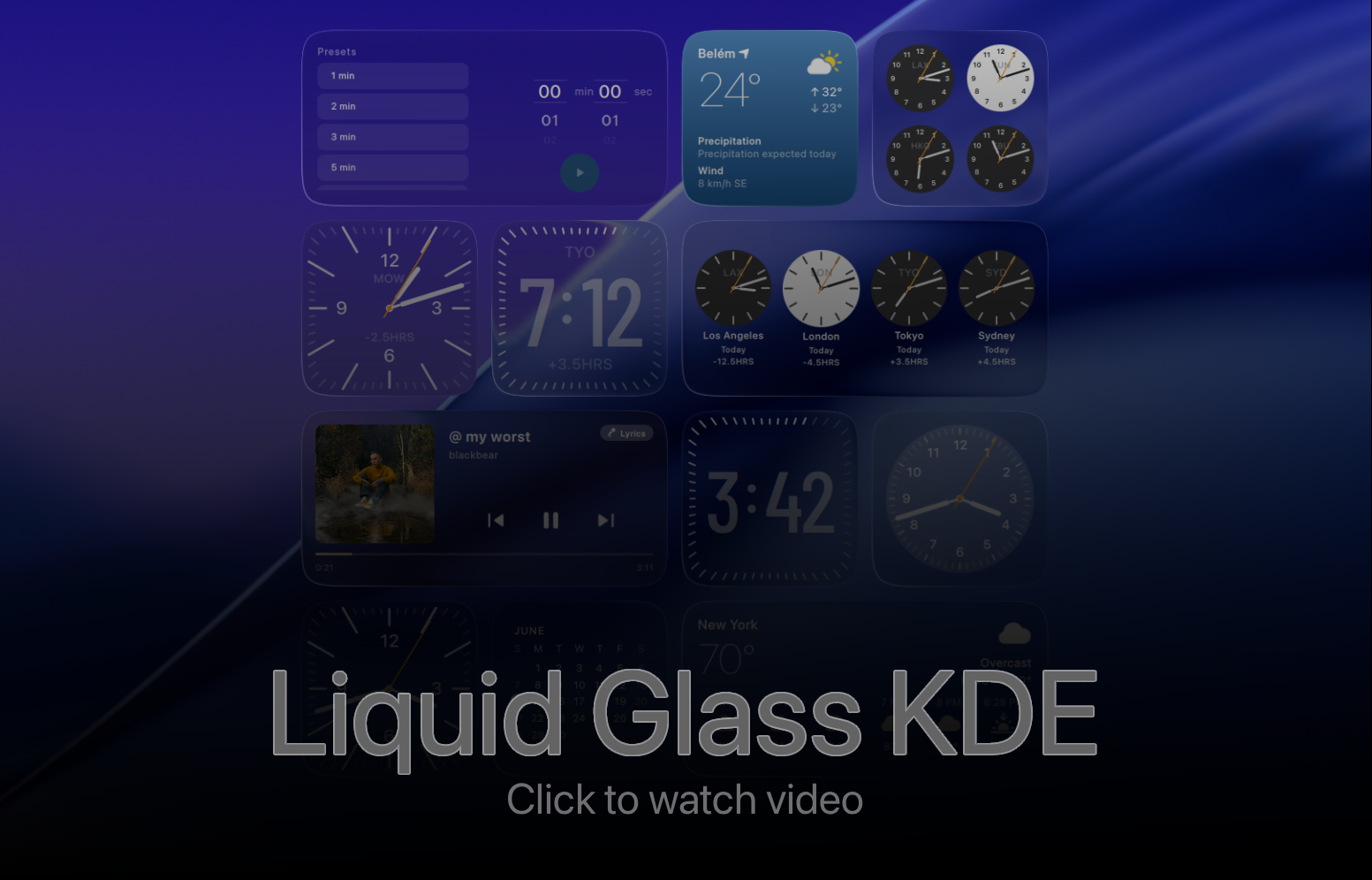
macOS Tahoe / iOS-style liquid-glass widgets for KDE Plasma 6.



An extensive widget set inspired from the latest MacOS (tahoe), along with liquid glass effect. Rather than taking the control away from the user, the widget offers all the parameters to be configured so you can basically customize EVERYTHING. The background for the widget is a custom shader, and even the solid modes are rendered by the shader since it supports gradients as well. If you want to make the custom styling consistent across your other widgets, you can simply copy and paste the widget style onto the other widgets.
Note: For use with video wallpapers, enable continuous sampling of background in the config (extra battery drain)


DST-correct per-zone time, half-hour offsets handled.


Now-playing controls for whatever's playing on your system (MPRIS). Supports synced lyrics via LRCLIB, and adapts between wide and tall-wide layouts. as you resize it. You gotta check the next/previous song album flip, it took me several hours to get it right :)
Playing songs from a browser? Album art needs a one-time setup — see Additional Setup → Media (Browser Album Art).


Stretch the widget wide to see upcoming events fetched from your actual calendar.
Note: the events side panel reads from KDE's calendar system (Akonadi). It needs a little one-time setup — see Additional Setup → Calendar Events.

A countdown timer with quick presets and a notification when time's up. Works on both the desktop and the panel. I tried to make the animations 1:1 as much as possible despite the limiations QML has.

Several widgets ship a compact panel representation (e.g. Weather, Timer) that follows your system theme, with the full view shown on click.
NOTE: WEATHER ON PANEL IS A SEPARATE WIDGET NAMED "Weather (Panel)"
- KDE Plasma 6.x and Qt 6.x
kpackagetool6(ships with Plasma), plusjqandzipqsb(fromqt6-base-dev-tools) — only needed if you rebuild the shaders
Clone the repository:
git clone https://github.com/jaxparrow07/liquidglass-kde-widgets.git
cd liquidglass-kde-widgetsInstall everything:
./install.sh --all # or: ./install.sh -aOr install a single widget by its package name:
./install.sh <package_name>Compiled .qsb shaders are committed, so you dont have to compile the shaders again. Rebuild them only if you've changed
a shader source:
./build-shaders.sh # 1-common/components/shaders/*.frag -> *.qsbThen install/package.
Available package names:
| Package | Widget |
|---|---|
calendar |
Calendar |
clock-analog / clock-analog-2 / clock-analog-3 |
Analog clocks I / II / III |
clock-digital |
Digital clock |
city-1 / city-2 / city-3 / city-digital |
World / City clocks |
music |
Music player |
weather |
Weather |
weather-panel |
Weather (panel) |
timer |
Timer |
The install script restarts Plasma Shell for you on success.
Download the packaged widgets from the releases page and load them manually:
- Desktop → Right Click → Enter Edit Mode
- Add Widget → Get Widgets → Install Widget From Local File
- Select the downloaded
.plasmoidfile
kpackagetool6 --type=Plasma/Applet -i packages/<package_name>   # install
kpackagetool6 --type=Plasma/Applet -u packages/<package_name>   # update
killall plasmashell && kstart plasmashell # restartEvery user-facing string is translatable. To add a language, see the Translation Guide.
Contributions are welcome — please open issues and pull requests on GitHub.
The Calendar widget's events side panel reads from KDE's calendar system.
-
The base calendar support (
plasma-workspace) is always present on Plasma 6. To pull in events from your synced accounts (Nextcloud, Google, Outlook, …), install the PIM plugin:sudo apt install kpim6-kdepim-addons
This also pulls in
kdepim-runtime(the Akonadi server). Holiday and astronomical event plugins ship with Plasma and need nothing extra. -
Add and sync your calendar sources in Merkuro Calendar or KOrganizer — the widget shows whatever Akonadi has already synced.
-
In the widget's settings, enable the calendar plugins (e.g. pimevents, holidays) and tick the collections you want to display.
Without this setup the side panel simply shows "No upcoming events".
The Music widget reads now-playing info over MPRIS. Native apps (Spotify, VLC, Elisa, …) expose their album art automatically, but songs played in a browser (YouTube Music, SoundCloud, Spotify Web, …) won't show album art unless the browser is bridged to MPRIS.
Install the Plasma Integration browser extension to fix this:
You may also need the host package on the system side:
sudo apt install plasma-browser-integrationWithout this, browser playback may still show controls but with no album art.
The source code in this repository is licensed under the GNU General Public License v3.0 (GPL-3.0). See LICENSE.
You are free to use, modify, and redistribute the code under those terms, including keeping copyright and attribution notices intact, providing the source, and licensing any derivative work under GPL-3.0.
The bundled fonts and icons are sourced from Apple's design system. They are not part of this project's GPL-licensed code. They remain the property of Apple Inc. and are included here for personal, non-commercial use only. I do not hold the rights to relicense them, and nothing in this repository's license grants you any rights to them beyond what Apple allows.
If you redistribute this project, you are responsible for making sure you have the right to redistribute these assets, or for removing them.
Disclaimer: this project is not affiliated with, endorsed by, or sponsored by Apple Inc. All product names, logos, and brands are property of their respective owners.
This project is free. The only official download locations are:
- GitHub: https://github.com/jaxparrow07/liquidglass-kde-widgets
- GitHub Releases: https://github.com/jaxparrow07/liquidglass-kde-widgets/releases/latest
- KDE Store: https://www.opendesktop.org/c/2362936/
Be careful with paid "installers", "packs", and scripts. Because the code is open source, anyone is allowed to link to it, make videos about it, or write a script that downloads and installs it. Some people sell these as if they were their own product. I'm not affiliated with them, I don't receive anything from those sales, and you never need to pay for this project.
Before paying for anything that claims to include Liquid Glass widgets:
- Check whether it simply downloads the files from the official links above.
- Check the install script. The official one is
install.shin this repo and takes about a minute to run yourself. - Don't run scripts from sources you don't trust without reading them first. An install script runs with your user's permissions.
If you find someone removing attribution, hiding the source, or claiming this work as their own, please open an issue or contact me. Those cases violate the license, and I'll follow up.
If you like the project, the best way to support it is the Buy Me a Coffee link at the top, or a star on the repo.
Most parts of this project is AI-assisted / spec developed. THIS PROJECT IS NOT VIBE CODED. I've manually rewritten several parts of the project and tested these for countless hours for all edge cases. Obviously, this wasn't developed with a single prompt, but I won't say I did all the heavy lifting. Perhaps this is what developing has come to, just shipping and making things faster. Because, USING AI, this project has taken me close to two months, and it would've taken me atleast 3-4 months without it. I, as a college student wouldn't have put that much time into a hobby project. So, I suppose as long as what you ship doesn't cost real money or is not slop, it's fine... I guess.